New AMD EPYC dedicated servers in Panama City, from $64.99 a month See servers

Pay with

Self-hosted app·Live streaming and web radio

Owncast server hosting
on a VPS in Panama City.

Owncast server hosting on a Pro VPS in PTY1, Panama City: transcoding sizing, monthly transfer included, Docker setup and what it costs.

Runs here
  • Docker

PTY1·Panama City

In stock

Recommended for this use case

Cloud VPS · ProductionPro · 6 vCPU · 8 GB RAM$22.99/mo320 GB NVMe · 20 TB transfer · 1 Gbps
  • 1 Gbps port20 TB of transfer a monthIncluded
  • Debian 13preinstalled with the orderIncluded
  • DDoS protection, 1 IPv4VNC console and full rootIncluded
Per month$22.99/mo

Optional: daily backups +20% · extra IPv4 $2 · priority support $10
Pay yearly: $206.99 a year, about 25% less

Deploy VPS Pro
  • No KYC
  • Crypto only
  • Panama jurisdiction
  • 6 vCPU, 8 GB RAM
  • 320 GB NVMe local storage
  • 20 TB transfer on a 1 Gbps port
  • DDoS protection included
  • Panamanian law

01/07

Short answer.

Yes. Owncast runs on our Pro plan at 22.99 USD a month, on Debian 13 in PTY1, our site in Panama City. The number to plan around is outbound traffic rather than CPU. Owncast encodes your stream once, so processor load stays flat whether five people are watching or five hundred, but every viewer downloads a separate copy of the video, and on a cloud that bills egress by the gigabyte the invoice grows with the audience. Each VPS plan includes a monthly transfer allowance, 20 TB on Cloud VPS Pro, so the limits that matter here are the plan's port speed and that allowance, both set out below.

02/07

What Owncast is
and who runs it.

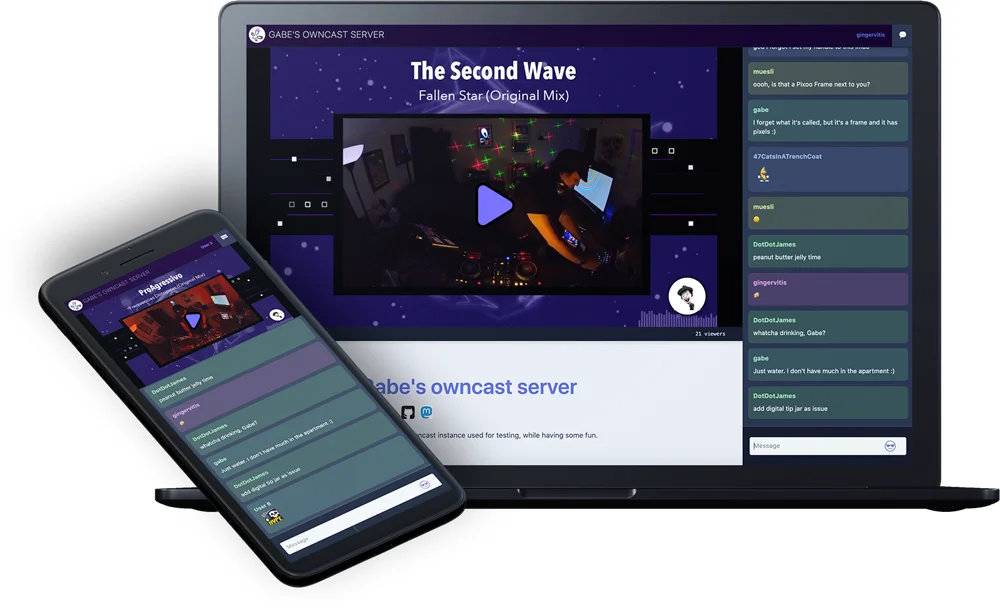
Owncast is a self-hosted server for one live channel with its own chat. You point OBS, Streamlabs or any other RTMP encoder at it; it passes your video through or transcodes it into HLS renditions, and viewers watch on a web page that carries the player and the chat together. The backend is written in Go, the web interface in React, and the code is published under the MIT licence. Gabe Kangas leads the project with a small volunteer team, and donations through Open Collective pay for its infrastructure.

The current release is v0.3.0, published on 3 September 2026. It added plugins, with JavaScript and Python SDKs, and Featured Streams, which lets one Owncast server list others over ActivityPub, the same protocol that already lets fediverse accounts follow a channel and be told when it goes live. One detail for container users: at the time of writing, Owncast's container documentation says plugin support is only in the nightly image (ghcr.io/owncast/owncast:nightly), while the stable image is owncast/owncast:latest on Docker Hub. For a channel with a real audience we would stay on the stable image and try nightly builds on a second instance.

Owncast suits streamers and small communities who want their channel and its moderation in their own hands rather than a platform's. It is built for live video, not for archives: segments are deleted as the stream moves on. Questions about Owncast itself belong in its GitHub issues and Discussions or in the project's Matrix room, #owncast.support:matrix.org. Questions about the server underneath go to us, through a support ticket from the client panel.

An Owncast stream page with its chat, on a laptop and on a phone
Owncast, from the project's README on GitHub (owncast/owncast, MIT licence).

Our servers are in Panama City and answer to Panamanian law. A US DMCA notice has no legal effect here, and we act only on valid orders from competent Panamanian authorities.

03/07

Requirements and sizing.

Owncast spends CPU on encoding and network capacity on delivery, and the two scale with different things. Disk hardly figures. Segments are written temporarily and cleaned up, and only the data/ directory grows over time: it holds the database and its hourly backups, custom emoji, viewer metrics, GeoIP data and, since 0.3.0, installed plugins.

CPU: roughly one core per transcoded rendition

The project's rule of thumb, drawn from its own tests, is that one CPU core handles about one transcoded output at 30 fps, that 60 fps costs roughly twice as much, and that passthrough (sending your encoder's video on untouched) costs very little. The number of viewers does not change the encoding load. Applied to common setups, with an allowance for the operating system, the reverse proxy and some headroom, that gives:

Renditions offeredTranscoding load (theoretical)vCPU to plan for
Passthrough onlyclose to zero1–2
Passthrough 1080p + 720p30about 1 core2–3
Passthrough 1080p + 720p30 + 480p30about 2 cores4
Transcoded 1080p60 + 720p60 + 480p30about 5 cores6–8

These figures are theoretical. vCPU performance differs between hosts, and resolution, bitrate and x264 preset all move the result. Passthrough alone is tempting and usually the wrong choice: in the project's own worked example, a single 5,000 kbps passthrough stream left 8 of 25 viewers buffering or unable to watch at all. A second rendition at 1,000–2,000 kbps is what keeps a stream watchable for people on mobile data or a weak connection.

Start with passthrough plus one 720p30 rendition, watch the hardware graph in Owncast's admin during a real broadcast, and add a third rendition only if the load stays comfortably below the vCPU count.

Bandwidth: every viewer is a separate download

Owncast publishes two formulas worth running before you order anything. Traffic in GB is bitrate in kbps × duration in seconds × viewers ÷ 8,000,000; peak throughput in Mbps is bitrate in kbps × viewers ÷ 1,000. For an independent streamer doing twelve three-hour broadcasts a month, the theoretical figures, before protocol overhead, look like this:

ScenarioPeak outboundPer 3-hour streamPer month (12 streams)
60 viewers, one 4,500 kbps rendition270 Mbps364.5 GB4,374 GB
60 viewers: 40 on 4,500 kbps, 20 on 1,500 kbps210 Mbps283.5 GB3,402 GB
200 viewers: 140 on 4,500 kbps, 60 on 1,500 kbps720 Mbps972 GB11,664 GB

Peak throughput is the figure to check first, because it behaves like a wall rather than a slope. At 4,500 kbps a 1 Gbps port carries about 222 simultaneous viewers in theory, fewer once TCP overhead and the server's other traffic take their share, and past that point viewers start to buffer.

If the audience outgrows the port, Owncast can upload its segments to S3-compatible object storage and let that serve the viewers. The server then sends out one copy of each rendition, about 6.5 Mbps for a 5,000 + 1,500 kbps pair, however many people are watching. This moves the egress bill to the storage provider rather than removing it, so read their download pricing first.

Ports, and the upload from your side

Your encoder needs TCP 1935 for RTMP, and the reverse proxy that terminates HTTPS needs 80 and 443. Owncast's own web port, 8080, should not face the internet: Owncast listens on every interface by default, and its documentation warns that visitors could then reach it directly over plain HTTP and bypass the proxy. RTMP is unencrypted, so the stream key crosses the network in clear. Rotate it after streaming from a network you don't trust, and restrict 1935 to your own address if it is fixed. At home, Owncast recommends upload capacity of at least 1.5 times your bitrate, 7.5 Mbps for a 5,000 kbps stream, which many asymmetric residential lines cannot hold while the rest of the household is online.

04/07

How to deploy it
with us.

  1. 01Order Cloud VPS Pro with Debian 13. No-KYC: an email address is enough, and the no-KYC hosting page explains what we ask for and what we don't.
  2. 02Create an A record, for example stream.example.com, pointing at the VPS address.
  3. 03Install Docker Engine from Docker's own apt repository, which supports Debian 13. Read the warning at the top of Docker's page first: ports that Docker publishes bypass ufw rules. That is why the Compose file below publishes only 1935 from Owncast and leaves 80 and 443 to Caddy. If you want to limit 1935 to your own IP, the rule belongs in Docker's DOCKER-USER chain, not in ufw.
  4. 04Create the two files below in /opt/owncast, then run docker compose up -d in that directory. Caddy obtains the certificate itself and passes through the chat websocket at /ws, which Owncast requires, without extra configuration.
yaml
# /opt/owncast/compose.yaml services: owncast: image: owncast/owncast:latest # pin a release tag from Docker Hub once tested restart: unless-stopped ports: - "1935:1935" # RTMP from your encoder; 8080 stays internal volumes: - ./data:/app/data caddy: image: caddy:2 restart: unless-stopped ports: - "80:80" - "443:443" volumes: - ./Caddyfile:/etc/caddy/Caddyfile:ro - caddy_data:/data volumes: caddy_data:
example
# /opt/owncast/Caddyfile stream.example.com { reverse_proxy owncast:8080 }
  1. 05Open https://stream.example.com/admin and sign in as admin with the default password abc123. Change it immediately, then change the stream key, a separate setting that also defaults to abc123. Until you do, anyone who has read Owncast's documentation can broadcast on your channel.
  2. 06In OBS, choose a custom service, set the server to rtmp://stream.example.com/live and paste the new key.
  3. 07Copy data/ off the server on a schedule. It is small, and it is the one part of the install you cannot rebuild from the image.

To upgrade, pull the new image and run docker compose up -d again. If you would rather not run Docker, Owncast's installer (curl -s https://owncast.online/install.sh | bash, run as an unprivileged user after you have read the script) downloads the binary and, if the host has none, an ffmpeg build. You then put Caddy or nginx in front yourself and run Owncast under systemd, and ufw governs every port the way you would expect.

05/07

Cost.

Cloud VPS Pro costs 22.99 USD a month with 20 TB of transfer included, and you can pay in crypto as an individual or as a business. Top-ups earn a bonus, and the unused balance is refundable within 14 days. The pricing page lists every plan if you need to size up later.

The difference shows when you price the first scenario above elsewhere. AWS bills internet egress from its US and EU regions at 0.09 USD per GB after a free 100 GB a month, so 4,374 GB of viewers would cost about 385 USD in transfer alone, before the instance (theoretical: 4,274 GB × 0.09). On Cloud VPS Pro the same month fits inside 22.99 USD, which comes to roughly half a US cent per gigabyte delivered (theoretical: 22.99 ÷ 4,374).

The allowance is the limit to plan around, and we would rather say so on this page than in a ticket: 20 TB a month is about 62 Mbps held around the clock (theoretical: 20 × 10¹² bytes × 8 ÷ 2,592,000 s), so a 24/7 channel pushing several hundred Mbps is a dedicated server workload rather than a VPS one, with traffic unmetered under fair use on its 10 Gbps port. If your numbers come close to the allowance, open a ticket before launch day.

06/07

Why stream
from Panama City.

PTY1 sits between North and South America, which suits a channel whose viewers are spread from Mexico down through Colombia and the Andean countries. It matters more for throughput. A TCP connection's achievable speed falls as round-trip time rises, so a viewer on a mediocre line close to the server holds the high rendition more reliably than the same viewer on another continent. If much of your audience is in Europe or Asia, put a CDN in front; Owncast documents how.

The server also sits under Panamanian law. A DMCA notice has no legal effect on servers in Panama. We forward copyright complaints to the customer and act on a decision of a competent Panamanian authority, or where the content is manifestly unlawful. Article 29 of the Constitution allows private communications to be intercepted or recorded only on the order of a judicial authority. As of 31 October 2026, the US Department of Justice lists CLOUD Act executive agreements with the United Kingdom and Australia only, none with Panama; a mutual legal assistance treaty between Panama and the United States has, however, been in force since 6 September 1995, so US investigators keep a formal route through Panamanian authorities. Law 51 of 2009 requires telecommunications companies and other networks that provide or sell communication services to keep certain user data for six months. Whether that reaches a hosting provider is a question for Panamanian counsel, and we won't pretend to settle it on a product page. The offshore hosting page covers the jurisdiction in more detail.

07/07

Limits and acceptable
use.

Running Owncast makes you the operator of a public service, and what goes out on the channel is your responsibility. In practice:

  • Hold the rights to what you broadcast. The DMCA not applying here does not make an unlicensed restream of a sports feed, a pay-per-view event or a film safe: rights holders can go to a competent Panamanian authority, and we act on its decision.
  • Content that is manifestly unlawful, with sexual material involving minors as the plainest case, is acted on as soon as we are made aware of it, without waiting for a court.
  • Owncast stores chat identities, display names and viewer metrics with GeoIP data, which makes you the party handling that personal data. Panama's framework is Law 81 of 2019, implemented by Executive Decree 285 of 2021. Panama has no EU adequacy decision, so if the GDPR applies to you, moving EU viewers' data to a server here needs appropriate safeguards such as the 2021 standard contractual clauses. A short privacy notice on the channel page is the minimum.
  • Keep the instance updated and off default credentials, and answer the copyright complaints we forward to you. A forwarded complaint is usually a rights holder's first step, not their last.
  • The rest of our acceptable use policy applies as on any plan: our acceptable use policy.

Catalogue·Options

Every configuration, every option, every price.

Six cloud VPS plans on AMD EPYC with local NVMe. Transfer is included on every plan, from 10 TB to 100 TB a month.

Six cloud VPS plans in PTY1 · transfer included on every plan

PlanvCPUMemoryNVMeTransferPortPriceDeploy
StarterStaging, dev22 GB80 GB10 TB / month1 Gbps$6.99/moDeploy Starter
StandardSmall apps44 GB160 GB15 TB / month1 Gbps$12.99/moDeploy Standard
PowerHeavy workloads1216 GB640 GB40 TB / month2 Gbps$42.99/moDeploy Power
UltraDatabases1632 GB1000 GB60 TB / month2 Gbps$65.99/moDeploy Ultra
TitanDense hosts3264 GB2000 GB100 TB / month5 Gbps$119.99/moDeploy Titan

Every plan runs on AMD EPYC with local NVMe. Yearly billing costs about 25% less.

Every plan

  • AMD EPYCon every host
  • Local NVMenot network storage
  • DDoS protectionalways on
  • 1 IPv4 addressmore at $2 each
  • VNC consoleand full root access

Options and upgrades · prices per month

OptionWhat you getPrice
Daily backupsSnapshots of the whole VPS+20%
Extra IPv4Per address, up to 64+$2.00
Priority supportPer VPS+$10.00
Longer billingPay quarterly or yearly−10% / −25%
Dedicated serverWhen a VPS is no longer enough: 10 Gbps, unmetered trafficfrom $64.99

FAQ

Questions
people ask first.

Short answers about running this in PTY1. If yours is not here, open a ticket from your panel.

Still unsure?

Tickets go straight to the people who run PTY1.

Contact support
How many viewers can Cloud VPS Pro serve with Owncast?

The CPU decides how many renditions you can offer; the port decides how many people can watch them. Per 1 Gbps of port, the theoretical ceiling is about 222 concurrent viewers at 4,500 kbps, or about 666 at 1,500 kbps, before overhead.

Can I use GPU encoding on a VPS?

Owncast supports hardware encoders such as VA-API and NVENC, but its documentation ties them to physical hardware, and getting the drivers right takes work even there. On Cloud VPS Pro, budget for software x264. If hardware encoding matters to your setup, ask about dedicated servers in a ticket and say which encoder you intend to use.

Do I need to verify my identity to order?

No-KYC: an email address is enough, and we accept crypto payments, including from businesses. How you sign up does not change who answers for the content; the obligations in the section above apply in full.

Will a DMCA notice take my stream offline?

A DMCA notice has no legal effect on servers in Panama. We forward copyright complaints to the customer and act on a decision of a competent Panamanian authority, or where the content is manifestly unlawful. If you hold the rights to what you stream, answer the forwarded complaint with your evidence and keep a copy of the exchange.

Should I use Docker or the Owncast installer?

Docker reduces upgrades to a pull and a restart and keeps Owncast's ffmpeg separate from the host system. The installer avoids Docker's interaction with the firewall and suits people who already run nginx or Caddy directly on the host. Either is fine on Debian 13; pick the one you will still be comfortable maintaining a year from now.

Sources

Every fact on this page, with its source

Accessed 2 Nov 2026 unless noted.

Your server in Panama,
ready when you are.

Cloud VPS start at $6.99 a month and are ready 60 to 120 seconds after you order.