New AMD EPYC dedicated servers in Panama City, from $64.99 a month See servers

Pay with

Self-hosted app·Developer tools, backends and AI

Self-hosting OmniTools
on a Panama Host VPS.

OmniTools hosting in PTY1, Panama City: the 0.7.0 Docker image behind Caddy on a $12.99 VPS, what the server logs, and which CDNs the browser still calls.

Runs here
  • React
  • NGINX
  • FFmpeg
  • Docker

PTY1·Panama City

In stock

Recommended for this use case

Cloud VPS · Small appsStandard · 4 vCPU · 4 GB RAM$12.99/mo160 GB NVMe · 15 TB transfer · 1 Gbps
  • 1 Gbps port15 TB of transfer a monthIncluded
  • Debian 13preinstalled with the orderIncluded
  • DDoS protection, 1 IPv4VNC console and full rootIncluded
Per month$12.99/mo

Optional: daily backups +20% · extra IPv4 $2 · priority support $10
Pay yearly: $116.99 a year, about 25% less

Deploy VPS Standard
  • No KYC
  • Crypto only
  • Panama jurisdiction
  • 4 vCPU, 4 GB RAM
  • 160 GB NVMe local storage
  • 15 TB transfer on a 1 Gbps port
  • DDoS protection included
  • Panamanian law

01/06

Short answer.

Yes. OmniTools is a static React application served by nginx, and the real work — trimming a video, merging PDFs, reformatting JSON — happens in the visitor's browser, so the server has very little to do. Our Starter VPS would run it; we recommend Cloud VPS Standard at $12.99 a month (4 vCPU, 4 GB RAM, 160 GB NVMe, 15 TB transfer) because you will want a TLS reverse proxy with a password in front of it and, in practice, one or two other small services on the same machine in PTY1, Panama City.

The point that matters most is narrower than the project's tagline. The client-side design keeps your files off the server, but the browser still fetches processing engines from third-party CDNs, and the nginx inside the image logs every request with the visitor's forwarded IP. Both can be dealt with; the setup below caps the log by default. Deploy Cloud VPS Standard with Debian 13.

02/06

What OmniTools is
and who maintains it.

OmniTools is an MIT-licensed project started and maintained by Ibrahima G. Coulibaly (GitHub user iib0011), with a steady flow of outside contributors; the repository passed 10,000 stars in 2026. Version 0.7.0 was published to Docker Hub on 20 October 2026 for amd64 and arm64. On the main branch as of 24 October 2026 we counted 128 tool definitions in twelve categories, string utilities being the largest group (29), and the interface ships in eleven languages, Spanish among them.

The container is a two-stage build: Node 20 compiles the Vite project, and nginx:alpine serves the resulting dist folder on port 80, with a fallback to index.html for client-side routes. There is no database, no backend API and no runtime configuration. Bookmarks, theme and language sit in the browser's localStorage, so they follow the browser rather than the person, and none of it is stored on the server.

What "processed on the client" actually covers

The heavy tools run WebAssembly builds of established libraries on the visitor's CPU. The upstream build does not serve those engines itself; it has the browser download them from third-party hosts at first use:

ToolsEngineFetched from (upstream default)
Video and audioffmpeg.wasm core 0.12.6unpkg.com
PDF compress, PDF protectGhostscript compiled to WASMcdn-wasm.b-cdn.net
Remove image background@imgly/background-removal model and WASMstaticimgly.com
Image to text (OCR)Tesseract.js 6 core and language datacdn.jsdelivr.net
Every page (navigation bar)GitHub star button iframeghbtns.com

Your files are not uploaded to any of these. What those hosts receive is the visitor's IP address, user agent and the fact that a given engine was requested. For a homelab that is usually acceptable; for an instance you run so that a team's work stays away from outside services, it is not. The quick fix is a Content-Security-Policy at the reverse proxy limiting scripts, connections and frames to your own origin: the tools in the table then fail with an error and the rest keep working. In our reading of the source these are the only remote fetches, but test the policy against the tools your users actually open. The thorough fix is a fork: point BASE_URL in src/lib/ffmpeg.ts and wasmBinaryFile in src/lib/ghostscript/gs-worker.js at local paths, pass a publicPath to removeBackground, set Tesseract's workerPath, corePath and langPath, drop the iframe, and build your own image. If you then publish that build, keep in mind that OmniTools is MIT while the IMG.LY background-removal library is AGPL.
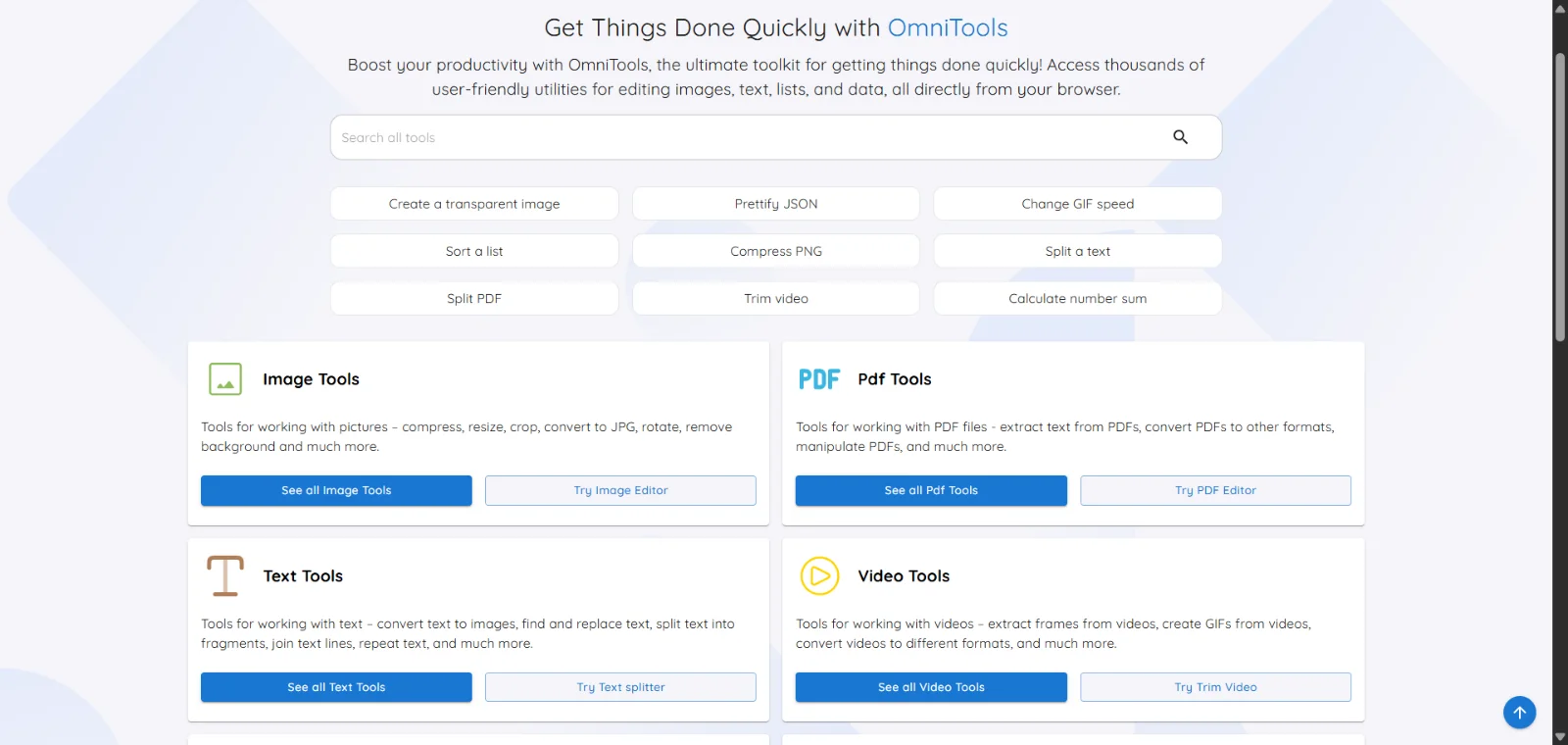
tools.example.org
OmniTools' home page: the tool search, shortcuts to common tasks, and the image, PDF, text and video tool groups
OmniTools, from the project's README on GitHub (iib0011/omni-tools, MIT licence).

Our servers are in Panama City and answer to Panamanian law. A US DMCA notice has no legal effect here, and we act only on valid orders from competent Panamanian authorities.

03/06

Requirements and sizing.

On the server, OmniTools needs what nginx needs to serve static files, which is very little. The container listens on port 80, and the only thing it accumulates on disk is its log. The resource that does scale is the visitor's machine: a 4K video trimmed in ffmpeg.wasm uses the laptop's CPU and memory, not ours, and a bigger VPS will not make it finish sooner. Size the server for transfer and for whatever else you put next to OmniTools.

Transfer is metered on our VPS plans; Standard includes 15 TB a month on a 1 Gbps port. With the engines left on their CDNs, your server only sends the application's own JavaScript and assets. Self-hosting the engines moves their weight onto your own transfer, which is the right trade for privacy.

PlanvCPURAMNVMeTransfer / monthPrice / monthFit for OmniTools
Starter22 GB80 GB10 TB$6.99OmniTools and Caddy alone, small team
Standard (recommended)44 GB160 GB15 TB$12.99OmniTools plus two or three other small services, such as —
Pro68 GB320 GB20 TB$22.99when the same box also runs server-side processing, for example —

04/06

How to deploy it
on Debian 13.

  1. 01Order Cloud VPS Standard with Debian 13 from the deploy link. Payment is in crypto, and opening the account is no-KYC: an email address is enough.
  2. 02Create a DNS A record on a subdomain, for instance tools.example.org, pointing at the VPS's IPv4 address (a subpath will not work; see the FAQ).
  3. 03Add Docker's own apt repository, which supports Debian 13 "Trixie", as its Debian guide describes, then run apt install docker-ce docker-ce-cli containerd.io docker-compose-plugin.
  4. 04Create /opt/omnitools/compose.yaml and /opt/omnitools/Caddyfile as below, generate the password hash, and start the stack.
yaml
# /opt/omnitools/compose.yaml services: omni-tools: image: iib0011/omni-tools:0.7.0 # pinned; change it deliberately restart: unless-stopped logging: driver: json-file options: max-size: "10m" max-file: "3" caddy: image: caddy:2 restart: unless-stopped ports: - "80:80" - "443:443" - "443:443/udp" volumes: - ./Caddyfile:/etc/caddy/Caddyfile:ro - caddy_data:/data - caddy_config:/config volumes: caddy_data: caddy_config:
caddyfile
# /opt/omnitools/Caddyfile tools.example.org { basic_auth { team PASTE_THE_BCRYPT_HASH_HERE } reverse_proxy omni-tools:80 }
bash
cd /opt/omnitools docker run --rm -it caddy:2 caddy hash-password # prompts for the password, prints the hash docker compose up -d docker compose logs -f caddy # watch for the certificate being issued

Two choices in that file are deliberate. The OmniTools service publishes no port and Caddy reaches it over the Compose network, because ports published by Docker bypass ufw and firewalld rules, as Docker's own documentation warns; the -p 8080:80 from the README would expose the raw instance whatever your firewall says. Then the log cap: the image keeps nginx's default main log format, which records $http_x_forwarded_for, and Caddy sets that header, so every visitor's real IP lands in Docker's JSON log, which is not rotated by default. Three files of 10 MB is a sensible ceiling; driver: none drops the access log entirely. Caddy writes no access log of its own unless you add a log directive.

Updating means changing the image tag and running docker compose pull && docker compose up -d. The whole instance is the two files in /opt/omnitools, which belong in a git repository rather than a backup plan.

05/06

Cost.

ItemPrice
Cloud VPS Standard, monthly$12.99
Cloud VPS Standard, yearly (≈ −25 %)≈ $9.75 / month, $116.99 / year
Daily backups (+20 %)≈ $2.60 / month
Extra IPv4$2 / month
Priority support$10 / month

The monthly price covers 4 vCPU, 4 GB RAM, 160 GB NVMe, 15 TB of transfer on a 1 Gbps port and one IPv4 address. For OmniTools alone we would skip the backup option, since the instance holds no data; take it if the same VPS carries anything with state. Payment is crypto only (AVAX, BCH, BNB, BTC, DOGE, ETH, LTC, SOL, TRX, USDC, USDT and XMR) against a balance in US dollars. Top-ups run from $25 to $5,000, with a bonus of 5 % from $50, 10 % from $100, 15 % from $250 and 20 % from $500, and the unused paid part is refundable within 14 days. Every plan and option is on the pricing page.

06/06

Acceptable use
and what stays your responsibility.

OmniTools carries little risk as web applications go, since it stores nothing and the files do not reach the server, but you remain the operator of the machine. Updating the image and Debian, using SSH keys and keeping the password on the instance are your job; remove the password and you are running a public utility site under your own name. What is not allowed on our network does not change with the application: phishing pages, malware distribution, attacks on other networks and unsolicited bulk email. Outbound port 25 is open on every VPS for your own mail, not for spam. The full rules are in our acceptable use policy.

A DMCA notice has no legal effect on servers in Panama. We forward copyright complaints to the customer and act on a decision of a competent Panamanian authority, or where the content is manifestly unlawful.

The access log is the one place where personal data accumulates. Visitor IP addresses are personal data under Panama's Law 81 of 2019, implemented by Executive Decree 285 of 2021. If your users are in the EU and the GDPR applies to you, Panama has no adequacy decision, so the transfer needs safeguards such as the 2021 standard contractual clauses. For most teams the shortest answer is to keep that log small or off, as above.

Catalogue·Options

Every configuration, every option, every price.

Six cloud VPS plans on AMD EPYC with local NVMe. Transfer is included on every plan, from 10 TB to 100 TB a month.

Six cloud VPS plans in PTY1 · transfer included on every plan

PlanvCPUMemoryNVMeTransferPortPriceDeploy
StarterStaging, dev22 GB80 GB10 TB / month1 Gbps$6.99/moDeploy Starter
ProProduction68 GB320 GB20 TB / month1 Gbps$22.99/moDeploy Pro
PowerHeavy workloads1216 GB640 GB40 TB / month2 Gbps$42.99/moDeploy Power
UltraDatabases1632 GB1000 GB60 TB / month2 Gbps$65.99/moDeploy Ultra
TitanDense hosts3264 GB2000 GB100 TB / month5 Gbps$119.99/moDeploy Titan

Every plan runs on AMD EPYC with local NVMe. Yearly billing costs about 25% less.

Every plan

  • AMD EPYCon every host
  • Local NVMenot network storage
  • DDoS protectionalways on
  • 1 IPv4 addressmore at $2 each
  • VNC consoleand full root access

Options and upgrades · prices per month

OptionWhat you getPrice
Daily backupsSnapshots of the whole VPS+20%
Extra IPv4Per address, up to 64+$2.00
Priority supportPer VPS+$10.00
Longer billingPay quarterly or yearly−10% / −25%
Dedicated serverWhen a VPS is no longer enough: 10 Gbps, unmetered trafficfrom $64.99

FAQ

Questions
people ask first.

Short answers about running this in PTY1. If yours is not here, open a ticket from your panel.

Still unsure?

Tickets go straight to the people who run PTY1.

Contact support
Does the server see the files I process in OmniTools?

Not with the upstream build. Files are opened and processed in the browser; the server receives only requests for pages and static assets, which nginx logs with the forwarded client IP. Some engines (ffmpeg, Ghostscript, the background-removal model, OCR data) are downloaded by the browser from third-party CDNs, without your files.

Can I run OmniTools on the $6.99 Starter VPS?

Yes. Starter (2 vCPU, 2 GB RAM, 80 GB NVMe, 10 TB of transfer) is enough for OmniTools and Caddy serving a small team. We recommend Standard because most people who self-host one toolbox add a second; if you know you will not, Starter is the honest answer.

Why does OmniTools not work under a path such as /tools/?

The build sets no Vite base and the React Router has no basename, so every asset and route is resolved from the root of the host. Serve it on its own subdomain, or rebuild with base: '/tools/' and a matching router basename.

Is the OmniTools interface available in Spanish?

Yes. The current build ships eleven locales, Spanish and Portuguese included, which suits teams in Panama and the rest of Latin America. The language is chosen and remembered in each user's browser.

Does hosting OmniTools in Panama keep it outside US jurisdiction?

We do not make that promise. As of 31 October 2026 the US Department of Justice lists CLOUD Act executive agreements only with the United Kingdom and Australia, none with Panama, but Panama and the United States have been bound by a mutual legal assistance treaty in criminal matters since 6 September 1995. Article 29 of Panama's Constitution allows private communications to be intercepted only on the order of a judicial authority, and private documents to be examined only on the order of a competent authority for specific purposes. For OmniTools the question is largely academic: the server holds no user files, only what you choose to log. The wider picture is on our page on offshore hosting in Panama.

Sources

Every fact on this page, with its source

Consulted 5 Nov 2026 unless noted.

EU and other countries

Your server in Panama,
ready when you are.

Cloud VPS start at $6.99 a month and are ready 60 to 120 seconds after you order.