New AMD EPYC dedicated servers in Panama City, from $64.99 a month See servers

Pay with

Self-hosted app·Personal data, cameras and smart home

OctoPrint hosting in Panama City
what a VPS can and cannot do for your printer.

OctoPrint hosting on a $12.99 VPS in PTY1, Panama City: where a remote OctoPrint works, why serial latency breaks it, and a Docker + WireGuard setup.

Runs here
  • OctoPrint
  • Python
  • Docker
  • Debian

PTY1·Panama City

In stock

Recommended for this use case

Cloud VPS · Small appsStandard · 4 vCPU · 4 GB RAM$12.99/mo160 GB NVMe · 15 TB transfer · 1 Gbps
  • 1 Gbps port15 TB of transfer a monthIncluded
  • Debian 13preinstalled with the orderIncluded
  • DDoS protection, 1 IPv4VNC console and full rootIncluded
Per month$12.99/mo

Optional: daily backups +20% · extra IPv4 $2 · priority support $10
Pay yearly: $116.99 a year, about 25% less

Deploy VPS Standard
  • No KYC
  • Crypto only
  • Panama jurisdiction
  • 4 vCPU, 4 GB RAM
  • 160 GB NVMe local storage
  • 15 TB transfer on a 1 Gbps port
  • DDoS protection included
  • Panamanian law

01/05

What OctoPrint
is and who runs it.

OctoPrint is a web front end and print server for consumer 3D printers, written in Python and released under the AGPL-3.0. Gina Häußge started it in late 2012 to control her first printer from another room, has worked on it full time since August 2014, and has been funded by its users since BQ's sponsorship ended in April 2016. The usual installation is a Raspberry Pi running the OctoPi image, connected to the printer by USB, extended with plugins for timelapses, failure detection and notifications.

The current stable release is 1.11.8, published on 23 June 2026 with two security fixes. OctoPrint 2.0.0 is in release candidates (rc7 appeared on 20 October 2026) and changes the architecture: printer communication moves into connector plugins, the classic serial code becomes one bundled connector, and connectors for Klipper/Moonraker and for Bambu Lab's local API are in development. 2.0 requires Python 3.9 or later; 1.11.x still runs on 3.7 and 3.8. With no stable 2.0.0 as of 5 November 2026, this page pins 1.11.8.

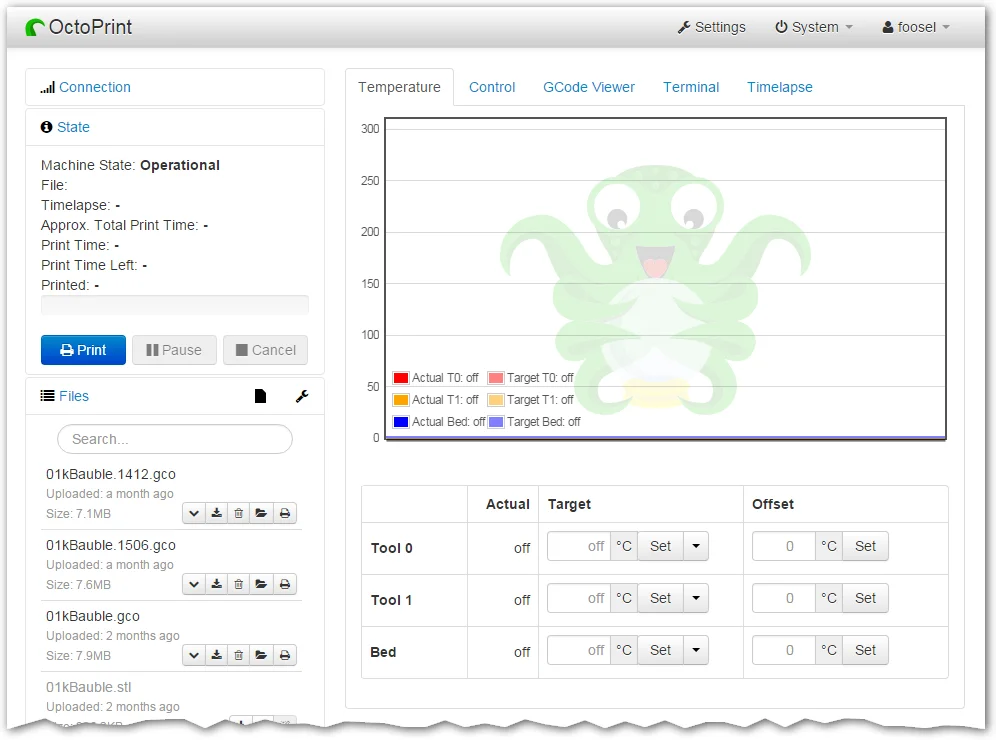
OctoPrint's web interface in the screenshot from the project's README: the printer connection, machine state and uploaded G-code files on the left, and the Temperature tab with its graph and target fields for two tools and the bed
OctoPrint, from the project's README on GitHub (OctoPrint/OctoPrint, AGPL-3.0 licence).

02/05

Requirements and sizing.

OctoPrint was built for a Raspberry Pi, so CPU and memory are rarely the limit on a VPS. The expensive moments are rendering a timelapse with ffmpeg when a print ends and analysing a large G-code upload; in between, an instance mostly waits for the printer. The official Docker image serves the interface on port 80 inside the container (a native install listens on 5000), and what grows on disk is uploaded G-code and finished timelapses.

PlanvCPU / RAM / NVMe / transferPriceWhere it fits
Starter2 / 2 GB / 80 GB / 10 TB$6.99/moOne instance that leaves timelapse rendering to the Pi
Standard4 / 4 GB / 160 GB / 15 TB$12.99/moOur pick: OctoPrint, WireGuard, a reverse proxy and server-side rendering, or a few instances side by side
Pro6 / 8 GB / 320 GB / 20 TB$22.99/moA small print farm, one instance per printer

Latency is the real requirement

With default settings OctoPrint keeps one line in flight: it sends a command and waits for the firmware's ok before sending the next. The round trip to the printer therefore caps how many moves per second reach the planner, and light in fibre (roughly 200,000 km per second) sets a floor no routing can beat:

From PTY1 toGreat-circle distanceMinimum round trip (theoretical)Lines per second, one in flight (theoretical)
Bogotá766 km7.7 msabout 130
Miami1,867 km18.7 msabout 53
Madrid8,164 km81.6 msabout 12

A curved perimeter at 60 mm/s, sliced into 0.5 mm segments, needs 120 lines per second. Real routes are longer than great circles and the tunnel adds queueing, so a printer in Bogotá would sit on the edge and anything further away starves: the head hesitates between segments and leaves blobs on every curve. Printing from the printer's SD card sidesteps this, since the line then carries only start, stop and status, but uploading to SD over serial is slow; the Smoothieware documentation reports around a megabyte a minute for some users. Klipper printers are the exception. The Klipper host beside the printer does the streaming and OctoPrint only talks to Moonraker's API, so distance costs you a slower dashboard rather than a ruined print.

Our servers are in Panama City and answer to Panamanian law. A US DMCA notice has no legal effect here, and we act only on valid orders from competent Panamanian authorities.

03/05

How to deploy it
with us.

Order the Standard plan with Debian 13 from the deploy page, then install Docker Engine from Docker's own Debian repository, which supports Debian 13 and ships the docker compose plugin.

  1. 01

    Pattern 1, recommended: OctoPrint on the Pi, the VPS as the gate

    Keep OctoPrint where the printer is and make the VPS the only way in. Install WireGuard on both machines and let the Pi dial out to the VPS; that works behind carrier-grade NAT and needs no port forward at home. Your phone or laptop joins the same tunnel and opens OctoPrint at the Pi's tunnel address, while the VPS's public IPv4 answers nothing but WireGuard's UDP port. If you add a reverse proxy for convenience, list it among OctoPrint's trusted reverse proxies: autologin trusts local addresses, and a proxy that hides the real client address can make every visitor look local. Our guide to VPN servers covers the tunnel itself.

  2. 02

    Pattern 2: OctoPrint itself on the VPS, in Docker

    This makes sense for a Klipper printer once 2.0 and the Moonraker Connector are stable (the connector currently needs the 2.0 development line), for testing plugins against the bundled Virtual Printer, and for SD-card printing over a serial bridge. The compose file is the project's example trimmed for a server: a pinned version, no devices: block because a VPS has no USB port to hand over, and the port bound to the WireGuard address only.

    yaml
    services: octoprint: image: octoprint/octoprint:1.11.8 restart: unless-stopped ports: - "10.8.0.1:8080:80" # the VPS's WireGuard address, not 0.0.0.0 volumes: - octoprint:/octoprint volumes: octoprint:
    sh
    docker compose up -d docker compose logs -f octoprint

    Order wg-quick@wg0 before Docker with a systemd After= drop-in, or the container cannot bind the tunnel address at boot. The image's edge tag follows release candidates; run it as a second stack with its own volume, never on the one your real printer depends on.

    For a Marlin printer across the tunnel, ser2net on the Pi exposes the USB port as a TCP socket, bound to the tunnel address only. OctoPrint does not open socket:// addresses itself. The third-party OctoPrint-Network-Printing plugin adds them through the Additional serial ports setting, but its repository shows two commits and no releases, so test it before trusting a print to it. The alternative, socat on the VPS turning the socket back into a serial device, suits a native install in a Python virtualenv better than Docker: socat's pty gets a new number on every restart, and a container's device mapping does not follow it. pySerial's documentation states that these sockets are neither encrypted nor authenticated, which is why they only ever cross WireGuard.

04/05

Cost.

ItemMonthly
Cloud VPS Standard: 4 vCPU, 4 GB, 160 GB NVMe, 15 TB transfer, 1 Gbps$12.99
Daily backups (+20 %)+$2.60
Extra IPv4+$2.00
Priority support+$10.00
Object storage, 250 GB S3-compatible bucket$1.99

Yearly billing takes about 25 % off, which puts Standard near $9.75 a month (theoretical). The 15 TB is a transfer allowance, not unmetered traffic, but OctoPrint will not trouble it: a 2 Mbit/s webcam stream watched around the clock comes to about 650 GB a month (theoretical), a little over 4 % of it. Outbound port 25 is open, so notification plugins can send mail directly, though delivery from a fresh IP address is your reputation to build. Finished timelapses belong in an S3-compatible object storage bucket, pushed with rclone, rather than on the NVMe disk.

Payment is in crypto only, priced in US dollars, and the account is no-KYC: an email address is enough. Top-ups run from $25 to $5,000; a $100 top-up carries a 10 % bonus, and the resulting $110 covers about eight and a half months of Standard (theoretical). The unused paid part of a top-up is refundable within 14 days. All plans and options are on the pricing page.

05/05

Limits and acceptable
use.

A remotely controlled printer is a machine with heaters and motors, and the OctoPrint project has said for years that it does not belong on the public internet; its January 2026 security advisory repeated the point. You keep access control enabled, put every instance behind WireGuard or an authenticating proxy, and update OctoPrint and its plugins when fixes ship. Version 1.11.8 closed a high-severity hole (CVE-2026-54134) through which a user with upload rights could pull readable files off the host.

Scanning address ranges for exposed OctoPrint or Moonraker instances is not allowed from our network, nor is connecting to printers you are not authorised to operate. Unattended printing remains your responsibility. If the VPS, the tunnel or your home line drops while a job streams over serial, the job stops where it was, and what the hotend does next depends on the firmware's timeouts; check them before leaving a remote setup running overnight. SD-card prints carry on regardless.

Model files are content like any other. A DMCA notice has no legal effect on servers in Panama. We forward copyright complaints to the customer and act on a decision of a competent Panamanian authority, or where the content is manifestly unlawful.

Catalogue·Options

Every configuration, every option, every price.

Six cloud VPS plans on AMD EPYC with local NVMe. Transfer is included on every plan, from 10 TB to 100 TB a month.

Six cloud VPS plans in PTY1 · transfer included on every plan

PlanvCPUMemoryNVMeTransferPortPriceDeploy
StarterStaging, dev22 GB80 GB10 TB / month1 Gbps$6.99/moDeploy Starter
ProProduction68 GB320 GB20 TB / month1 Gbps$22.99/moDeploy Pro
PowerHeavy workloads1216 GB640 GB40 TB / month2 Gbps$42.99/moDeploy Power
UltraDatabases1632 GB1000 GB60 TB / month2 Gbps$65.99/moDeploy Ultra
TitanDense hosts3264 GB2000 GB100 TB / month5 Gbps$119.99/moDeploy Titan

Every plan runs on AMD EPYC with local NVMe. Yearly billing costs about 25% less.

Every plan

  • AMD EPYCon every host
  • Local NVMenot network storage
  • DDoS protectionalways on
  • 1 IPv4 addressmore at $2 each
  • VNC consoleand full root access

Options and upgrades · prices per month

OptionWhat you getPrice
Daily backupsSnapshots of the whole VPS+20%
Extra IPv4Per address, up to 64+$2.00
Priority supportPer VPS+$10.00
Longer billingPay quarterly or yearly−10% / −25%
Dedicated serverWhen a VPS is no longer enough: 10 Gbps, unmetered trafficfrom $64.99

FAQ

Questions
people ask first.

Short answers about running this in PTY1. If yours is not here, open a ticket from your panel.

Still unsure?

Tickets go straight to the people who run PTY1.

Contact support
Can I connect my printer's USB cable to a server in PTY1?

No. A VPS has no USB passthrough. Keep OctoPrint on a Pi beside the printer and use the VPS as the gateway, or bridge the serial port over WireGuard and accept the latency limits above.

Should I run the OctoPrint 2.0 release candidate?

Not on the printer you depend on. Pin 1.11.8 for production and run the edge tag in a separate stack against the Virtual Printer. The 2.0 candidates remove long-deprecated plugin APIs, so check your plugins first; if one breaks the interface, the /recovery/ page restarts OctoPrint in safe mode.

Can I publish OctoPrint on the VPS's public IP with a strong password?

You can, and we advise against it. A login is one layer, and the 2026 advisories (an API-key timing side channel up to 1.11.5, file exfiltration through upload endpoints up to 1.11.7) are the kind of bug a second layer catches. WireGuard runs on the same VPS at no extra cost.

Does Panama's jurisdiction change anything for a print server?

For hobby G-code, little; more if you store client designs for a print business. The VPS sits in PTY1 and is operated by Cyber Host International, S.A., Addison House Plaza, 1st floor, Panama City. Article 29 of Panama's Constitution allows private documents to be examined only on the order of a competent authority and for specific purposes. As of 31 October 2026 the US Department of Justice lists CLOUD Act executive agreements only with the United Kingdom and Australia, none with Panama, while a mutual legal assistance treaty in criminal matters has bound Panama and the United States since 6 September 1995. More on our jurisdiction page.

How do I get help with the setup?

Open a support ticket from the client panel, with the plan, the OS image and the relevant lines of octoprint.log.

Sources

Every fact on this page, with its source

Consulted 5 Nov 2026 unless noted.

Panamanian law and authorities

EU and other countries

Your server in Panama,
ready when you are.

Cloud VPS start at $6.99 a month and are ready 60 to 120 seconds after you order.