Self-hosted app·Personal data, cameras and smart home
Homebox (sysadminsmedia) hosting
on a Panama VPS.
Homebox (sysadminsmedia) hosting in Panama City: a Docker Compose file for v0.27.1, honest sizing, off-server backups and the defaults to change first.
- Go
- SQLite
- Docker
- Caddy
PTY1·Panama City
In stockRecommended for this use case
- 1 Gbps port15 TB of transfer a monthIncluded
- Debian 13preinstalled with the orderIncluded
- DDoS protection, 1 IPv4VNC console and full rootIncluded
Optional: daily backups +20% · extra IPv4 $2 · priority support $10
Pay yearly: $116.99 a year, about 25% less
- No KYC
- Crypto only
- Panama jurisdiction
- 4 vCPU, 4 GB RAM
- 160 GB NVMe local storage
- 15 TB transfer on a 1 Gbps port
- DDoS protection included
- Panamanian law
01/06
Short answer.
Yes. Homebox runs on our Cloud VPS in PTY1, Panama City, and the plan we recommend is VPS Standard: 4 vCPU, 4 GB RAM, 160 GB NVMe and 15 TB of monthly transfer at 1 Gbps, for $12.99 a month. That is far more than Homebox itself asks for; its maintainers put idle memory for the whole container below 50 MB. The headroom goes to the reverse proxy, a nightly off-server backup and several years of item photos without a disk upgrade. If Homebox will be alone on the server and you photograph sparingly, the $6.99 Starter plan listed on our pricing page will run it as well.
The setting that matters most is a default. Self-registration is on (HBOX_OPTIONS_ALLOW_REGISTRATION=true), which is harmless on a home LAN and a real problem on a public IPv4: anyone who finds the hostname can open an account on your instance. Create your own account, set the variable to false and recreate the container before you enter a single item.
02/06
What Homebox is
and who maintains it.
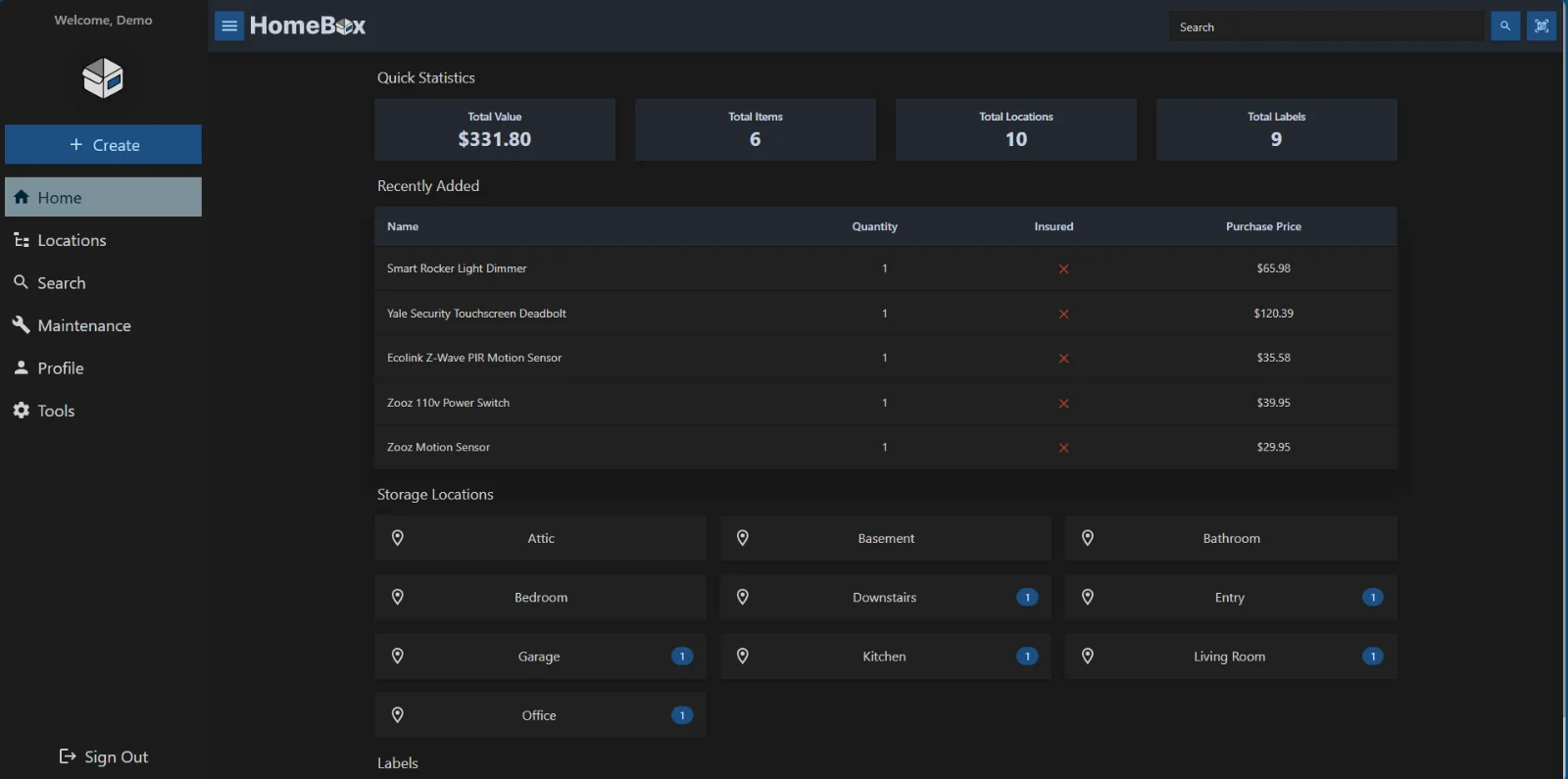
Homebox is a self-hosted inventory for the contents of a house or a small workshop. Each entry records what the object is, where it lives (room, shelf, box inside a box), what it cost, when its warranty ends and when it was last serviced, and it can carry photos, receipts, manuals, tags and custom fields. It prints QR labels that open the record from a phone camera and can pull product data from a barcode. The backend is Go with the web interface embedded in the same binary, and data sits in SQLite unless you configure PostgreSQL.
The original author, hay-kot, archived his repository on 12 June 2024. SysAdminsMedia continues the project under the same AGPL-3.0 licence, and theirs is the image to run; the old ghcr.io/hay-kot/homebox images receive no fixes. The continuation moves quickly. v0.26.0 (June 2026) merged items and locations into a single "entity" model, added API keys and password resets, and closed several security advisories. v0.27.0 (17 October 2026) rebuilt search and added Meilisearch as an optional backend. v0.27.1, released on 23 October 2026 and current as we write, is a security release for an upstream Node.js vulnerability. Because v0.24.0, v0.25.0 and v0.26.0 each shipped fixes for published CVEs, plan to update Homebox on a schedule rather than install it once.
Our servers are in Panama City and answer to Panamanian law. A US DMCA notice has no legal effect here, and we act only on valid orders from competent Panamanian authorities.
03/06
Requirements and sizing.
Homebox is one container listening internally on port 7745. It needs no companion service unless you choose PostgreSQL or Meilisearch, and for a household you should choose neither. SQLite runs in WAL mode by default and copes with a few people editing at once, and the built-in database search is adequate for thousands of items. Every extra container is another image to patch and another thing your backup has to capture consistently.
The database stays small; the attachment store is what grows. As a theoretical example, 2,000 items with three 3 MB phone photos each come to about 18 GB, plus the 500 × 500 thumbnails Homebox generates on upload. Standard's 160 GB holds that several times over, with space left for Docker images and a local restore. The default upload limit is 10 MB per file (HBOX_WEB_MAX_UPLOAD_SIZE, expressed in MB), which a scanned manual or a high-resolution photo can exceed, so the compose file below raises it to 25.
Traffic is a non-issue. A household opening a thousand full-size photos every day would move roughly 90 GB a month (theoretical) against the 15 TB included, so the fact that VPS transfer is an allowance, not unmetered as on our dedicated servers, does not come into play.
| Plan | vCPU / RAM / NVMe | Transfer / port | Price per month | Fit for Homebox |
|---|---|---|---|---|
| Starter | 2 / 2 GB / 80 GB | 10 TB / 1 Gbps | $6.99 | Homebox alone, modest photo library |
| Standard | 4 / 4 GB / 160 GB | 15 TB / 1 Gbps | $12.99 | Recommended: Homebox, Caddy, backups, years of photos |
| Pro | 6 / 8 GB / 320 GB | 20 TB / 1 Gbps | $22.99 | Only if you add PostgreSQL, Meilisearch and other apps |
The only ports to open are 22 for SSH and 80/443 for the reverse proxy. Port 7745 never needs to face the internet.
04/06
Deploying Homebox
with Docker on our VPS.
Order VPS Standard with Debian 13 from the Homebox deploy link. We are a no-KYC host: an email address is enough to open the account. When the server is up, point an A record such as inventory.example.com at its IPv4, install Docker Engine and the Compose plugin from Docker's own apt repository (the Debian instructions on docs.docker.com cover Debian 13), and install Caddy from Debian's caddy package.
Since v0.26.0, Homebox will not start without HBOX_AUTH_API_KEY_PEPPER set to a secret of at least 32 bytes, and changing it later invalidates every API key. Generate it once, keep it with your backups, and do not reuse the placeholder from the upstream sample file.
mkdir -p /opt/homebox/data && cd /opt/homebox
openssl rand -base64 48 > hbox.pepper
chown 65532:65532 data hbox.pepper   # the hardened image runs as UID 65532
chmod 400 hbox.pepper
Then /opt/homebox/compose.yml:
services:
  homebox:
    image: ghcr.io/sysadminsmedia/homebox:latest-hardened   # pin a release tag once it works
    restart: unless-stopped
    environment:
      - HBOX_MODE=production
      - HBOX_LOG_LEVEL=info
      - HBOX_WEB_MAX_UPLOAD_SIZE=25
      - HBOX_OPTIONS_ALLOW_REGISTRATION=true    # set to false after creating your account
      - HBOX_OPTIONS_TRUST_PROXY=true
      - HBOX_OPTIONS_ALLOW_ANALYTICS=false
      - HBOX_OPTIONS_GITHUB_RELEASE_CHECK=false
      - HBOX_AUTH_API_KEY_PEPPER_FILE=/run/secrets/hbox_pepper
    secrets:
      - hbox_pepper
    volumes:
      - ./data:/data
    ports:
      - "127.0.0.1:3100:7745"

secrets:
  hbox_pepper:
    file: ./hbox.pepper
The port is bound to 127.0.0.1 because Docker writes its own iptables rules for published ports ahead of anything ufw adds; a plain 3100:7745 would expose Homebox on the public interface even with ufw set to deny. HBOX_MODE is set explicitly because the documented default is development. The release check is off because it calls api.github.com at start-up; turn it back on if you want the reminder. The hardened tag is a distroless image with no shell and no MQTT client, so switch to latest-rootless if you need MQTT notifications or want to docker exec into the container.
The whole Caddyfile:
inventory.example.com {
	reverse_proxy 127.0.0.1:3100
}
Caddy obtains a Let's Encrypt certificate, passes through the WebSocket Homebox uses for live updates, and sends X-Forwarded-For and X-Forwarded-Proto without being told to, which is why HBOX_OPTIONS_TRUST_PROXY=true is in the compose file; without it, labels and some links come out wrong. Run docker compose up -d and systemctl reload caddy, open the hostname, register, change HBOX_OPTIONS_ALLOW_REGISTRATION to false, and run docker compose up -d again.
Once it works, replace latest-hardened with the release tag shown on the project's GitHub container package page and upgrade deliberately: read the notes, back up, change the tag, docker compose pull && docker compose up -d. v0.26.0 is the argument for this. It reworked the database, its own notes asked users to back up first, and they advised going straight to v0.26.1 because attachments broke on Docker deployments. With Watchtower or a habit of blind pulls, latest would have delivered that unannounced.
Password-reset emails need the HBOX_MAILER_* settings. Outbound port 25 is open on every VPS we sell, but mail sent directly from a new VPS address is usually filtered as spam, so give Homebox an SMTP relay on port 587. Without SMTP, upstream provides a reset-password command that prints a new random password for a given account.
For backups, remember that SQLite in WAL mode can produce an inconsistent copy if the file is copied while Homebox writes to it, so stop the container for the few seconds a snapshot takes. Restic pointed at one of our S3-compatible object storage buckets gives you an encrypted, versioned copy off the server:
cd /opt/homebox && docker compose stop homebox
restic -r s3:https://<bucket-endpoint>/<bucket> backup /opt/homebox
docker compose start homebox
Supply the bucket keys through AWS_ACCESS_KEY_ID and AWS_SECRET_ACCESS_KEY, the repository password through RESTIC_PASSWORD_FILE, and run it nightly from a systemd timer. Because /opt/homebox holds the pepper and the compose file as well as the data, a restore onto a fresh VPS is Docker, restic restore, docker compose up -d. The ZIP export added in v0.26.0 is handy for moving a collection between instances, but upstream still labels it experimental, so it should not be your only copy. We cover the restic side in more depth in object storage.
Homebox can also write attachments straight to an S3 bucket through HBOX_STORAGE_CONN_STRING (s3://bucket?endpoint=…&use_path_style=true). Even when that test passes, we would keep attachments on the VPS's NVMe: restores are simpler, and the bucket stays a backup target rather than a live dependency.
05/06
Cost.
| Item | Per month |
|---|---|
| VPS Standard (4 vCPU, 4 GB RAM, 160 GB NVMe, 15 TB transfer, 1 Gbps) | $12.99 |
| Daily VPS backups, optional (+20 %) | +$2.60 |
| Object storage, 250 GB bucket for restic | $1.99 |
| Extra IPv4, not needed for Homebox | $2.00 |
The setup above, Standard plus a 250 GB bucket, costs $14.98 a month. Yearly billing takes roughly 25 % off the VPS, which works out at about $9.75 a month or $116.99 a year for Standard. Our daily backups restore the whole machine; restic in a bucket gives you a copy you control and can restore anywhere. For data this size the bucket is cheaper and covers more failure modes, though nothing stops you running both.
Payment is in crypto only: AVAX, BCH, BNB, BTC, DOGE, ETH, LTC, SOL, TRX, USDC, USDT or XMR, with prices and balances in US dollars. Top-ups run from $25 to $5,000 and earn a bonus of 5 % from $50, 10 % from $100, 15 % from $250 and 20 % from $500. The unused paid part of a top-up is refundable within 14 days.
06/06
Jurisdiction,
acceptable use and your obligations.
A Homebox instance is a precise list of what is worth taking from a home, where it sits, its serial number and the receipt that proves its value, so where it is stored matters. In PTY1 it falls under Panamanian law, and article 29 of Panama's Constitution allows private communications to be intercepted only on a judicial order and private documents to be examined only by a competent authority for specific purposes. As of 31 October 2026, the US Department of Justice lists CLOUD Act executive agreements only with the United Kingdom and Australia, none with Panama. That is not immunity: Panama and the United States have a mutual legal assistance treaty in force since 6 September 1995, so a foreign request can still reach a server here through a Panamanian authority. The offshore hosting page sets out what this does and does not protect.
A personal household inventory rarely raises data-protection questions. An inventory kept for others does: tool check-outs with employee names, or a rental property's contents logged against tenants. That is processing personal data, Panama's Law 81 of 2019 and its implementing Executive Decree 285 of 2021 apply, and you are the party responsible for it. If the people concerned are in the EU, Panama has no adequacy decision, so the transfer needs safeguards such as the 2021 standard contractual clauses.
The attachment store is for your inventory, not a file-sharing service, and using it to distribute copyrighted or unlawful material breaches our terms. A DMCA notice has no legal effect on servers in Panama. We forward copyright complaints to the customer and act on a decision of a competent Panamanian authority, or where the content is manifestly unlawful. Your side of the arrangement: keep Homebox and Debian patched, keep registration closed, use SSH keys rather than passwords, and respect the law of the country you live in as well as Panama's. To reach us, open a support ticket from the client panel.
Catalogue·Options
Every configuration, every option, every price.
Six cloud VPS plans on AMD EPYC with local NVMe. Transfer is included on every plan, from 10 TB to 100 TB a month.
| Plan | vCPU | Memory | NVMe | Transfer | Port | Price | Deploy |
|---|---|---|---|---|---|---|---|
| StarterStaging, dev | 2 | 2 GB | 80 GB | 10 TB / month | 1 Gbps | $6.99/mo | Deploy Starter |
| StandardRecommendedSmall apps | 4 | 4 GB | 160 GB | 15 TB / month | 1 Gbps | $12.99/mo | Deploy Standard |
| ProProduction | 6 | 8 GB | 320 GB | 20 TB / month | 1 Gbps | $22.99/mo | Deploy Pro |
| PowerHeavy workloads | 12 | 16 GB | 640 GB | 40 TB / month | 2 Gbps | $42.99/mo | Deploy Power |
| UltraDatabases | 16 | 32 GB | 1000 GB | 60 TB / month | 2 Gbps | $65.99/mo | Deploy Ultra |
| TitanDense hosts | 32 | 64 GB | 2000 GB | 100 TB / month | 5 Gbps | $119.99/mo | Deploy Titan |
Every plan runs on AMD EPYC with local NVMe. Yearly billing costs about 25% less.
Every plan
- AMD EPYCon every host
- Local NVMenot network storage
- DDoS protectionalways on
- 1 IPv4 addressmore at $2 each
- VNC consoleand full root access
FAQ
Questions
people ask first.
Short answers about running this in PTY1. If yours is not here, open a ticket from your panel.
Is the $6.99 Starter plan enough for Homebox?
For one household with Homebox as the only application, yes. Its limits are the 80 GB disk once photos accumulate and 2 GB of RAM once you add other containers. Everything Homebox needs lives in one directory, so moving to a larger plan later means copying /opt/homebox and running docker compose up -d on the new server.
Should I use PostgreSQL instead of SQLite?
Only if several people edit heavily at the same time or you already run and back up a PostgreSQL server. Decide at the start: switching later means going through the export and import feature, which upstream still calls experimental.
Can I keep Homebox off the public internet entirely?
Yes, and it is the tidier option for a private inventory. Run WireGuard or Tailscale on the VPS and publish the port on the tunnel address instead of 127.0.0.1, for example "10.8.0.1:3100:7745". The registration default then stops mattering, though we would still turn it off.
I run the old hay-kot image. Can I switch to this one?
Back up the data directory, change the image to ghcr.io/sysadminsmedia/homebox, add the API-key pepper, and keep the same /data mount. Upstream notes that the old HBOX_WEB_*_TIMEOUT values now need an explicit unit, such as 10s.
Does Homebox send data anywhere?
Analytics are off by default. The release check calls GitHub unless you disable it, as the compose file above does. Barcode lookups send the scanned code to third-party product databases, and notifiers send to the URLs you configure. Other outbound traffic comes only from features you configure yourself, such as SMTP, OIDC sign-in or OpenTelemetry export.
Sources
Every fact on this page, with its source
Accessed 5 Nov 2026 unless noted.
Panamanian law and authorities
- Constitution of Panama, article 29Gaceta Oficial 25176
- Law 81 of 26 March 2019Gaceta Oficial 28743-A
EU and other countries
- US Department of JusticeCLOUD Act resources · verified 31 Oct 2026
- GDPR, article 46GDPR, article 46
Industry, providers and software
- SysAdminsMediahomebox README
- SysAdminsMediarelease v0.27.1
Other references
- Homebox documentationInstall
- nixpkgscode.ornl.gov
- US Department of StatePanama mutual legal assistance treaty
Your server in Panama,
ready when you are.
Cloud VPS start at $6.99 a month and are ready 60 to 120 seconds after you order.