Self-hosted app·Business software
Frappe Helpdesk hosting
on a Panama VPS.
Frappe Helpdesk hosting in Panama City: v16.1.0 on a 4 vCPU / 4 GB VPS for $12.99/mo, with Docker deploy steps, sizing, email and backups.
- Frappe
- MariaDB
- Redis
- Python
PTY1·Panama City
In stockRecommended for this use case
- 1 Gbps port15 TB of transfer a monthIncluded
- Debian 13preinstalled with the orderIncluded
- DDoS protection, 1 IPv4VNC console and full rootIncluded
Optional: daily backups +20% · extra IPv4 $2 · priority support $10
Pay yearly: $116.99 a year, about 25% less
- No KYC
- Crypto only
- Panama jurisdiction
- 4 vCPU, 4 GB RAM
- 160 GB NVMe local storage
- 15 TB transfer on a 1 Gbps port
- DDoS protection included
- Panamanian law
01/05
What Frappe
Helpdesk is.
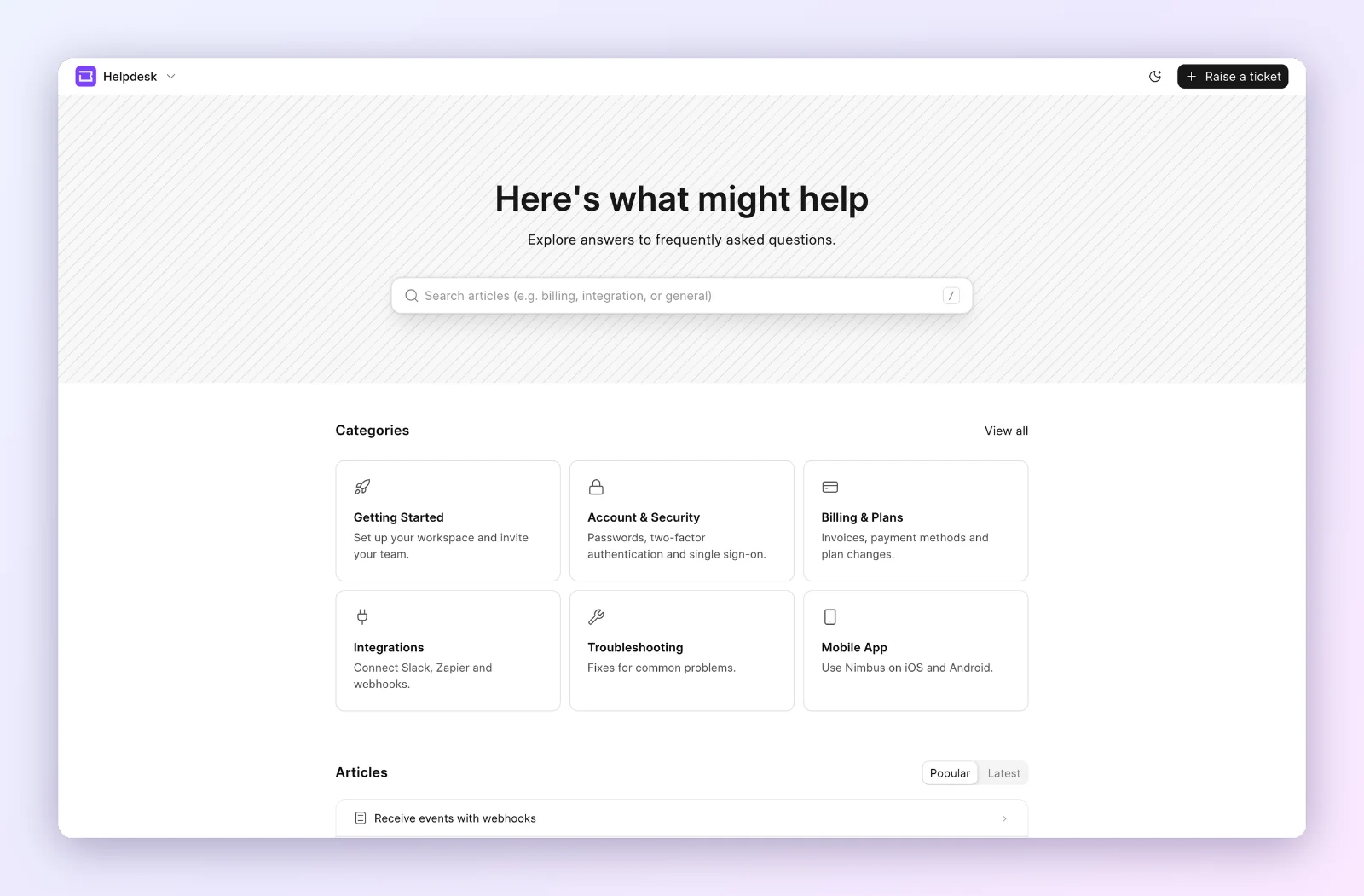
Frappe Helpdesk is an open-source ticketing system published by Frappe Technologies, the company behind ERPNext, under the AGPL-3.0 licence. Frappe built it for its own customer service, after finding the support module in ERPNext too awkward to work in every day. It is an app on Frappe Framework, so the server side is Python on MariaDB and the interface is Vue, built with Frappe UI. Agents and customers get separate portals, tickets arrive by email or through the portal, and the app handles SLA tracking, assignment rules, saved replies and a knowledge base that customers can search before they write in.
It suits two kinds of operator. The other does not want to pay per agent, per month, for a support queue. The licence only matters if you change the code: serve a modified Helpdesk to users over a network and AGPL-3.0 requires you to offer them its source. Running it unmodified carries no such obligation.
As of 5 November 2026 the project's compatibility matrix pairs version-15 with Frappe v15 and version-16 with Frappe v16, and supports no other combination. The last 1.x release, v1.32.0, shipped on 3 November 2026, a day before v16.1.0. Frappe plans to support framework v16 until the end of 2029, which makes it the obvious target for anything you install today.
02/05
Requirements,
and the plan that fits.
A production Frappe site is about ten long-running containers. The frappe_docker stack, which the official installer uses, runs a gunicorn backend, an nginx frontend, a Node websocket server for live updates, short and long queue workers, a scheduler, separate Redis instances for cache and queue, MariaDB, and Traefik in front for TLS. Helpdesk adds no service of its own; it lives inside the backend image. Memory goes mostly to MariaDB and the Python workers, and you should expect the heaviest moment to be a migrate after an upgrade, which runs alongside the live workers, rather than a busy Monday morning.
If you install with bench instead of Docker, framework v16 is set up with Python 3.14 and Node 24, MariaDB 10.6.6 or later (11.8 recommended) and Redis 6 or later. Debian 13 ships Python 3.13, so a bench install means maintaining a uv-managed Python on the side. The Docker image carries its own runtimes, which is the main reason we recommend it on a VPS.
| Plan | vCPU | RAM | NVMe | Transfer | Price/mo | For Helpdesk |
|---|---|---|---|---|---|---|
| Starter | 2 | 2 GB | 80 GB | 10 TB | $6.99 | Evaluation only |
| Standard | 4 | 4 GB | 160 GB | 15 TB | $12.99 | One Helpdesk site in production |
| Pro | 6 | 8 GB | 320 GB | 20 TB | $22.99 | Helpdesk plus ERPNext or CRM on the same bench |
Starter will boot the stack, but 2 GB shared between MariaDB, two Redis instances and the Python workers leaves no headroom for an upgrade, and a migration that runs out of memory halfway through is a bad afternoon. Standard is the plan we recommend.
Disk is the variable you control. Attachments dominate it: a theoretical team taking 200 tickets a day with one 1 MB attachment each adds about 73 GB a year, close to half of Standard's 160 GB. Move backups and old attachments off the server before that becomes urgent.
On the network side, Traefik needs ports 80 and 443 inbound (80 for the certificate challenge and the HTTPS redirect), plus 22 for SSH. Outbound, Helpdesk needs IMAP on 993 to read mail and SMTP submission on 587 or 465 to send it. MariaDB and Redis must stay on the internal Docker network. If you use ufw, remember that Docker writes its own iptables rules for published ports ahead of ufw's, so a port that looks closed in ufw status may be open.
Our servers are in Panama City and answer to Panamanian law. A US DMCA notice has no legal effect here, and we act only on valid orders from competent Panamanian authorities.
03/05
Deploying it
in PTY1.
- 01Order Cloud VPS Standard with Debian 13 preselected. Sign-up is no-KYC: an email address is enough, and payment is in crypto.
- 02Create an A record for the helpdesk hostname, say
help.example.com, pointing at the VPS address, and wait until it resolves. The Let's Encrypt step fails if you run the installer first. - 03Install Docker Engine and the Compose plugin from Docker's own Debian repository. The installer will try to install Docker itself, but you want to know which version you are running and where it came from.
- 04Run Frappe's installer with the Helpdesk image:
wget https://frappe.io/easy-install.py
python3 ./easy-install.py deploy \
    --project=helpdesk_prod_setup \
    --email=you@example.com \
    --image=ghcr.io/frappe/helpdesk \
    --version=stable \
    --app=helpdesk \
--sitename help.example.com- 05Open
https://help.example.com/helpdesk, sign in as Administrator, change the password and turn on two-factor authentication before you invite agents.
The tag stable moves by definition. Record which image you actually installed, so that a later rollback has a target:
docker image inspect --format '{{index .RepoDigests 0}}' ghcr.io/frappe/helpdesk:stableTwo shortcuts to avoid. The docker-compose.yml in the Helpdesk repository is a development setup that ships with admin/admin as credentials, and pwd.yml in frappe_docker is a disposable demo that cannot take additional apps. If you want full control instead of the script, build from frappe_docker's compose.yaml with its MariaDB, Redis and Traefik HTTPS overrides.
- 01
Email
Helpdesk reads a mailbox over IMAP through a Frappe Email Account and sends replies over SMTP. Outbound port 25 is open on every VPS, so delivering mail directly from the server is possible, but a new IP address with no sending history, attached to a system that sends automatic acknowledgements, tends to end up in spam folders. Send through the provider that already hosts your domain's mail, on port 587, and publish SPF and DKIM records for it. Give Helpdesk a dedicated support address rather than a shared inbox full of autoresponders; release v1.30.2 had to fix mail loops caused by bounces and auto-replies.
- 02
Backups and upgrades
Do not assume the installer schedules off-server backups. A nightly cron entry on the host produces them:
15 3 * * * docker compose --project-name helpdesk_prod_setup exec -T backend bench --site help.example.com backup --with-filesThe files land under
help.example.com/private/backupsin the sites volume (docker volume lsgives its name). Push them to an S3-compatible object storage bucket with restic or rclone; a 250 GB bucket costs $1.99 a month, and restic encrypts before anything leaves the server. Use the bucket through the S3 API, not as a mounted directory under MariaDB. The VPS daily-backup option makes a sensible second layer, because it captures the whole system rather than one site.For an upgrade, take a backup, pull the new image, recreate the containers and run
bench --site help.example.com migratein the backend container. Read the release notes before you pull. A move from the v15 line to v16 is a framework major upgrade with its own migration guide, not a routine update.
04/05
What it costs.
| Item | Per month |
|---|---|
| Cloud VPS Standard (4 vCPU, 4 GB, 160 GB NVMe, 15 TB) | $12.99 |
| Daily backups (+20 %) | $2.60 (theoretical: 20 % of $12.99) |
| Object storage, 250 GB | $1.99 |
| Total | $17.58 (theoretical) |
Yearly billing takes roughly 25 % off the VPS, which comes to $116.99 a year, or $9.75 a month (theoretical). An extra IPv4 is $2 a month and priority support $10; Helpdesk itself costs nothing to license. Traffic on a VPS is metered against an allowance: Standard includes 15 TB a month at 1 Gbps. A helpdesk barely registers against that; a theoretical 1,000 portal page loads a day at 2 MB each comes to 60 GB a month, 0.4 % of the allowance.
Payment is in crypto only (BTC, ETH, XMR, USDT, USDC and several others), with prices and balances in US dollars. Top-ups between $25 and $5,000 earn a bonus from $50 upward, so a $100 top-up becomes $110 of credit, about eight and a half months of Standard (theoretical), and the unused paid part is refundable within 14 days. The full grid is on the pricing page.
05/05
Where the data sits,
and what is not allowed.
A helpdesk is a database of other people's personal data: names, email addresses, and whatever customers paste into a ticket. Hosting it in Panama changes which law governs the server and leaves your duties as the operator where they were. Panama's Law 81 of 2019 on personal data protection, implemented by Executive Decree 285 of 2021, applies to it. Article 29 of the Constitution allows private communications to be intercepted only on a judicial order, and private documents to be examined only on the order of a competent authority and for specific purposes.
That does not place the data beyond the reach of foreign courts; it changes the route a request has to take. Panama and the United States have had a mutual legal assistance treaty in force since 6 September 1995, while as of 31 October 2026 the US Department of Justice lists CLOUD Act executive agreements only with the United Kingdom and Australia. Law 51 of 2009 requires telecommunications companies and other providers of communication services to keep certain user data for six months; whether it applies to a hosting provider is a question for Panamanian counsel. Our offshore hosting page goes further into the jurisdiction.
The open port 25 is not permission to send bulk unsolicited mail from the helpdesk. A support portal dressed up as a bank, an exchange or a courier to collect logins is phishing, and we treat it as manifestly unlawful content. A DMCA notice has no legal effect on servers in Panama. We forward copyright complaints to the customer and act on a decision of a competent Panamanian authority, or where the content is manifestly unlawful. Your side of the arrangement is to keep the instance patched, protect the Administrator account, answer your own customers' data requests, and deal with the complaints we forward. The full rules are in our acceptable use policy; questions go through a support ticket from the client panel.
Catalogue·Options
Every configuration, every option, every price.
Six cloud VPS plans on AMD EPYC with local NVMe. Transfer is included on every plan, from 10 TB to 100 TB a month.
| Plan | vCPU | Memory | NVMe | Transfer | Port | Price | Deploy |
|---|---|---|---|---|---|---|---|
| StarterStaging, dev | 2 | 2 GB | 80 GB | 10 TB / month | 1 Gbps | $6.99/mo | Deploy Starter |
| StandardRecommendedSmall apps | 4 | 4 GB | 160 GB | 15 TB / month | 1 Gbps | $12.99/mo | Deploy Standard |
| ProProduction | 6 | 8 GB | 320 GB | 20 TB / month | 1 Gbps | $22.99/mo | Deploy Pro |
| PowerHeavy workloads | 12 | 16 GB | 640 GB | 40 TB / month | 2 Gbps | $42.99/mo | Deploy Power |
| UltraDatabases | 16 | 32 GB | 1000 GB | 60 TB / month | 2 Gbps | $65.99/mo | Deploy Ultra |
| TitanDense hosts | 32 | 64 GB | 2000 GB | 100 TB / month | 5 Gbps | $119.99/mo | Deploy Titan |
Every plan runs on AMD EPYC with local NVMe. Yearly billing costs about 25% less.
Every plan
- AMD EPYCon every host
- Local NVMenot network storage
- DDoS protectionalways on
- 1 IPv4 addressmore at $2 each
- VNC consoleand full root access
FAQ
Questions
people ask first.
Short answers about running this in PTY1. If yours is not here, open a ticket from your panel.
Can I run Frappe Helpdesk on the $6.99 Starter plan?
For a trial, yes. For production, no: 2 GB has to hold MariaDB, two Redis instances and the Python workers, and leaves nothing for a migration during an upgrade. Standard costs $6 a month more, which is less than one failed upgrade.
Docker or a bench install?
Docker, unless you already maintain a bench. Framework v16 is installed with Python 3.14 and Node 24, Debian 13 ships Python 3.13, and the official image carries the right runtimes along with Helpdesk and the telephony app it depends on.
Can I add Helpdesk to an existing ERPNext site?
Yes, on the same bench, provided the branches match: version-15 Helpdesk with v15 ERPNext, version-16 with v16. With Docker, build a custom image from frappe_docker with both apps listed in apps.json, then install Helpdesk on the site with bench install-app. Size for the Pro plan's 8 GB in that case.
Does Helpdesk need port 25?
No. It needs IMAP to read the support mailbox and SMTP submission to send replies, normally through your existing mail provider on port 587. Port 25 is open on every VPS if you choose to run your own mail server.
Should I use Frappe Cloud instead?
If you do not want to be the system administrator, probably. Frappe Cloud takes care of installation, upgrades and monitoring. On our VPS you have root and the responsibility that comes with it; in exchange you get a server in Panama City under Panamanian law, sign-up with an email address, and crypto payment.
What happens if someone sends a DMCA notice about my knowledge base?
It has no legal effect on a server in Panama. We forward the complaint to you and act on a decision of a competent Panamanian authority, or where the content is manifestly unlawful.
Sources
Every fact on this page, with its source
Checked 5 Nov 2026 unless noted.
Panamanian law and authorities
- Panama Law 81 of 26 March 2019 on personal data protection, implemented by Executive Decree 285 of 28 May 2021Gaceta Oficial 28743-A
- Panama Law 51 of 2009, art. 6, six-month retention by telecommunications and communication-service providersGaceta Oficial 26374
- Constitution of Panama, art. 29G.O. 25176 (Legispan)
EU and other countries
- US Department of Justice, CLOUD Act resources: executive agreements with the United Kingdom and Australia onlyjustice.gov · verified 31 Oct 2026
- GDPR art. 46 (appropriate safeguards)EUR-Lex, Regulation (EU) 2016/679
Industry, providers and software
- Frappe Helpdesk README, develop branch: compatibility matrix, end of main at 1.32, production install command, development Docker setup and its default credentials, motivation for the projectgithub.com
- Frappe Helpdesk repository, AGPL-3.0 licencegithub.com/frappe/helpdesk
- Helpdesk release v16.1.0, published 4 November 2026github.com
- Helpdesk release v1.32.0, published 3 November 2026github.com
- Helpdesk release v1.30.2: fix for mail loops from bounces and autoresponders; Helpdesk and telephony included in the Docker imagegithub.com/frappe/helpdesk/releases
- frappe_docker: production compose.yaml, overrides for MariaDB, Redis and proxies, disposable pwd.ymlgithub.com/frappe/frappe_docker
Other references
- Frappe Framework installation and system requirements (Python 3.14, Node 24, MariaDB 10.6.6+/11.8, Redis 6+)docs.frappe.io
- Frappe supported versions, framework v16 planned end of life end of 2029frappe.io/support-versions
- Panama–United States mutual legal assistance treaty, signed 1991, in force 6 September 1995US Department of State
Your server in Panama,
ready when you are.
Cloud VPS start at $6.99 a month and are ready 60 to 120 seconds after you order.