Self-hosted app·Business software
Easy!Appointments hosting
in Panama City.
Easy!Appointments hosting on a 4 GB VPS in Panama City: a Docker setup for 1.6.1, sizing, the PHP 8.2 caveat, cost and your obligations.
- PHP
- MySQL
- Docker
- NGINX
PTY1·Panama City
In stockRecommended for this use case
- 1 Gbps port15 TB of transfer a monthIncluded
- Debian 13preinstalled with the orderIncluded
- DDoS protection, 1 IPv4VNC console and full rootIncluded
Optional: daily backups +20% · extra IPv4 $2 · priority support $10
Pay yearly: $116.99 a year, about 25% less
- No KYC
- Crypto only
- Panama jurisdiction
- 4 vCPU, 4 GB RAM
- 160 GB NVMe local storage
- 15 TB transfer on a 1 Gbps port
- DDoS protection included
- Panamanian law
01/07
Short answer.
Yes. Easy!Appointments runs on any of our Cloud VPS plans in PTY1, Panama City, and the one we recommend is Cloud VPS Standard: 4 vCPU, 4 GB RAM, 160 GB NVMe and 15 TB of monthly transfer for $12.99 a month. You get root on Debian 13 and run either the upstream Docker image or a native PHP install. The thing that matters most at the moment is the PHP runtime under the application rather than the application: the official image is built on php:8.2-apache, PHP 8.2 gets its last security fixes on 31 December 2026, and the PHP2Shell flaws patched on 21 October 2026 hit Apache's mod_php hardest. Whichever route you take, run php -v before you publish a booking link.
02/07
What Easy!Appointments
is and who runs it.
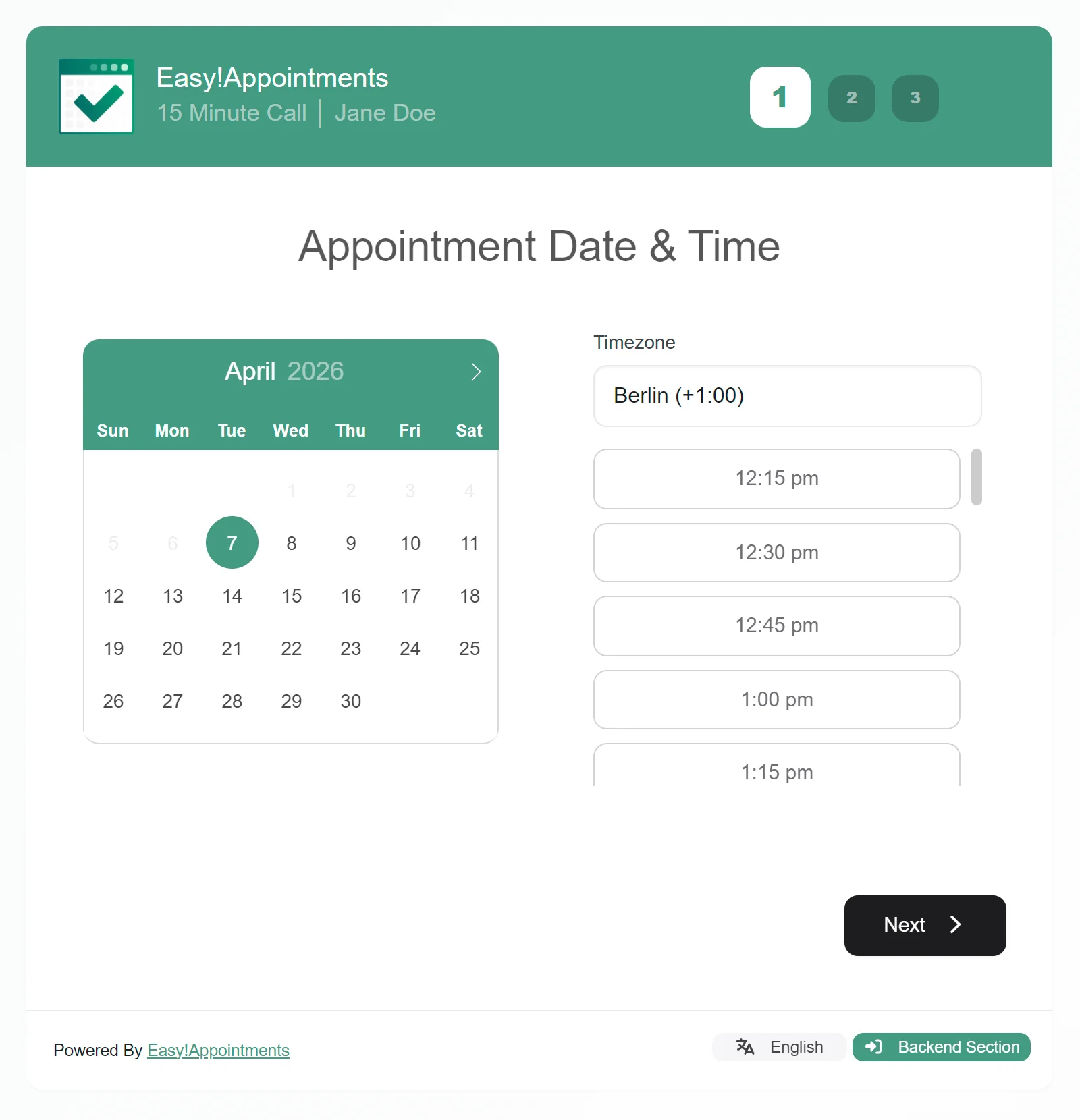
Easy!Appointments is a self-hosted booking application written in PHP on top of MySQL, maintained by Alex Tselegidis and released under GPL v3. Customers choose a service, a provider and a free slot on a public booking page; staff work in a back office with separate admin, provider and secretary roles. It syncs with Google Calendar and CalDAV, exposes a REST API and webhooks, can authenticate staff against LDAP, and since 1.6.0 attaches Jitsi or Google Meet links to appointments.
The people who run it are small operators: a physiotherapy practice in El Cangrejo, a law firm in Obarrio taking consultations from clients abroad, a workshop booking service slots. The software is light. The data is not: names, phone numbers, email addresses and whatever your staff type into the notes field. Hosting it well is therefore mostly a matter of patching and backups, not of horsepower.
The current stable release is 1.6.1, published on 19 October 2026. It adds no features, and 19 of its fixes carry a security label, including a CAPTCHA that could be skipped, providers able to reassign other providers' appointments, and REST API updates that could be redirected to an administrator record. Do not expose anything older to the internet.
Our servers are in Panama City and answer to Panamanian law. A US DMCA notice has no legal effect here, and we act only on valid orders from competent Panamanian authorities.
03/07
Requirements and sizing.
Upstream asks for Apache 2.4 or nginx, PHP 8.2 or newer with the curl, json, mbstring, gd, simplexml and fileinfo extensions, and a MySQL database with no hard minimum version. The official compose example still pins MySQL 8.0, which Oracle stopped patching on 30 April 2026; we use 8.4 LTS instead.
| Item | Value |
|---|---|
| Application | Easy!Appointments 1.6.1 (19 Oct 2026) |
| PHP | 8.2+; official image is php:8.2-apache |
| Database | MySQL; we run 8.4 LTS |
| Docker image | alextselegidis/easyappointments:1.6.1, ≈209 MB compressed, amd64 and arm64 |
| Inbound ports | 80 and 443 only |
| Outbound | 443 (Google, CalDAV, Jitsi, webhooks); 587 or 465 to your mail relay |
A single practitioner would probably get by on Cloud VPS Starter (2 vCPU, 2 GB, $6.99), and we would not talk you out of trying it. We recommend Standard because the heavy moments on this machine are not page views. They are MySQL holding its buffer pool, Apache's prefork workers, the nightly dump, and docker compose pull fetching a 200 MB image while the old container is still serving. With 4 GB those can overlap without the kernel reaching for swap. Transfer will not be your limit: 15 TB spread over 30 days is about 500 GB a day (theoretical), far beyond what a booking page for a handful of providers serves. If you host several businesses, give each its own installation and database and move to Cloud VPS Pro (8 GB) when memory runs tight.
04/07
How to deploy it
with us.
Order Cloud VPS Standard with Debian 13 from the link above, point an A record such as book.example.com at the server, and install Docker Engine with the compose plugin from Docker's own Debian repository. Then place this file in /opt/easyappointments/compose.yaml, with the secrets in a .env beside it.
services:
  app:
    image: alextselegidis/easyappointments:1.6.1
    restart: unless-stopped
    depends_on: [db]
    ports:
      - "127.0.0.1:8080:80"
    environment:
      BASE_URL: https://book.example.com
      DEBUG_MODE: "FALSE"
      DB_HOST: db
      DB_NAME: easyappointments
      DB_USERNAME: ea
      DB_PASSWORD: ${DB_PASSWORD}
      PROXY_IPS: 172.30.0.0/24
      MAIL_PROTOCOL: smtp
      MAIL_SMTP_AUTH: "1"
      MAIL_SMTP_HOST: ${SMTP_HOST}
      MAIL_SMTP_PORT: "587"
      MAIL_SMTP_CRYPTO: tls
      MAIL_SMTP_USER: ${SMTP_USER}
      MAIL_SMTP_PASS: ${SMTP_PASS}
      MAIL_FROM_ADDRESS: bookings@example.com
      MAIL_FROM_NAME: Example Clinic
      MAIL_REPLY_TO_ADDRESS: bookings@example.com
    volumes:
      - ea-storage:/var/www/html/storage
    networks: [ea]

  db:
    image: mysql:8.4
    restart: unless-stopped
    environment:
      MYSQL_ROOT_PASSWORD: ${DB_ROOT_PASSWORD}
      MYSQL_DATABASE: easyappointments
      MYSQL_USER: ea
      MYSQL_PASSWORD: ${DB_PASSWORD}
    volumes:
      - ea-db:/var/lib/mysql
    networks: [ea]

networks:
  ea:
    ipam:
      config:
        - subnet: 172.30.0.0/24

volumes:
  ea-storage:
  ea-db:
This departs from the upstream README on purpose. The tag is pinned, because latest moves under you. Debug mode is off, and the application connects as a dedicated user instead of root with the password secret. The port is bound to loopback because Docker writes its own iptables rules, which a host firewall such as ufw does not see, so a plain 80:80 would bypass it. The storage volume keeps sessions, logs and uploads across container rebuilds. PROXY_IPS tells the application to trust forwarded headers from the compose network; without it every visitor arrives as the proxy's address and the login and booking rate limits treat them as one client.
TLS goes in front. Two lines of Caddy will do it and fetch the certificate:
book.example.com {
    reverse_proxy 127.0.0.1:8080
}
Run docker compose up -d, open the site, complete the setup wizard, then check the runtime with docker compose exec app php -v. You want 8.2.35 or later. The 1.6.1 tag was re-pushed in early November next to a 1.6.1-php2shell-fix tag carrying the same digest, so an image pulled before then may predate the fix; docker compose pull && docker compose up -d replaces it. While you are in there, note that the Dockerfile enables Xdebug: check php -i | grep xdebug.mode and turn it off if it is not already.
Calendar sync and housekeeping are console commands that upstream intends for cron. Without the first, provider calendars only update when somebody triggers a sync by hand. In the host's crontab (note that % must be escaped there):
*/10 * * * * cd /opt/easyappointments && docker compose exec -T -u www-data app php index.php console sync
15 3 * * *   cd /opt/easyappointments && docker compose exec -T -u www-data app php index.php console cleanup
40 3 * * *   cd /opt/easyappointments && docker compose exec -T db sh -c 'exec mysqldump --single-transaction -uroot -p"$MYSQL_ROOT_PASSWORD" easyappointments' | gzip > /var/backups/ea/ea-$(date +\%F).sql.gz
A dump that lives on the same disk is not a backup. Push /var/backups/ea to an S3-compatible bucket with restic (restic -r s3:https://<endpoint>/<bucket> backup /var/backups/ea); the bucket is reached through the S3 API, not mounted as a disk.
If the image is still on PHP 8.2 in January 2027, move to a native install on the same VPS. Debian 13 ships PHP 8.4, patched against PHP2Shell in 8.4.27-1~deb13u1 (DSA-6574-1) and supported upstream until 31 December 2028:
apt install nginx php8.4-fpm php8.4-mysql php8.4-curl php8.4-mbstring php8.4-gd php8.4-xml mariadb-server unzipUnzip the 1.6.1 release, make storage writable by www-data, copy config-sample.php to config.php, fill in the URL and database credentials, and the wizard does the rest. Upstream documents MySQL; Debian's MariaDB 11.8 is what we would try first on this route, but test a restore of your data before you depend on it. If you also want staff calendars on your own hardware rather than Google's, see cloud VPS.
05/07
Cost.
| Item | Per month |
|---|---|
| Cloud VPS Standard: 4 vCPU, 4 GB, 160 GB NVMe, 15 TB transfer, 1 Gbps | $12.99 |
| Daily VPS backups (+20 %) | $2.60 (theoretical: 20 % of $12.99) |
| Object storage, 250 GB bucket for off-site dumps | $1.99 |
| Total | $17.58 (theoretical) |
Paying yearly takes roughly 25 % off the VPS, $116.99 a year instead of $155.88. Extra IPv4 addresses are $2 a month and priority support $10. The 15 TB is an included monthly allowance, not unmetered traffic. Payment is in crypto only (AVAX, BCH, BNB, BTC, DOGE, ETH, LTC, SOL, TRX, USDC, USDT, XMR), with prices and balances in US dollars; top-ups run from $25 to $5,000, carry a bonus of 5 % from $50 up to 20 % from $500, and the unused paid part is refundable within 14 days. Business customers paying in crypto are welcome. Every plan is on the pricing page.
The honest downside: this is a VPS with root access, not managed hosting. Patching Debian, the images and the application is your job. If you would rather pay someone for that, upstream sells managed Easy!Appointments hosting.
06/07
Where the booking data sits,
and which law applies.
The server is in Panama City, and Panama's Law 81 of 2019 on personal data protection, implemented by Executive Decree 285 of 2021, governs what you do with your clients' details. Article 29 of the Constitution allows private communications to be intercepted only on a judicial order, and private documents to be examined only on the order of a competent authority for specific purposes. Panama is a different legal route, not an unreachable one: the DOJ lists CLOUD Act executive agreements only with the UK and Australia as of 31 October 2026, but a US–Panama mutual legal assistance treaty in criminal matters has been in force since 6 September 1995. The offshore hosting page covers this in more depth.
If any of your clients are in the EU, Panama has no adequacy decision, so the transfer needs safeguards such as the 2021 standard contractual clauses. Hosting in PTY1 also does nothing for the copies your integrations make. Google Calendar sync and Google Meet put appointment details on Google's servers, public Jitsi links point at someone else's infrastructure, and confirmation emails pass through your mail relay. If the notes field holds anything medical, have Panamanian counsel look at your obligations before you go live.
07/07
Limits and acceptable
use.
Not allowed: booking pages that imitate another business or collect credentials or payment details under false pretences, unsolicited bulk mail sent through the notification mailer or anything else on the server, and content that is unlawful in Panama. You are responsible for the personal data your booking page collects, for having a basis to collect it, for answering your clients' access and deletion requests (the retention settings and console cleanup help with the last part), and for keeping PHP, the database and the application patched. A DMCA notice has no legal effect on servers in Panama. We forward copyright complaints to the customer and act on a decision of a competent Panamanian authority, or where the content is manifestly unlawful. The full rules are in our acceptable use policy.
Outbound port 25 is open on every VPS, so you can run your own MTA. For booking confirmations we would relay through an SMTP provider on 587, as the compose file does.
Catalogue·Options
Every configuration, every option, every price.
Six cloud VPS plans on AMD EPYC with local NVMe. Transfer is included on every plan, from 10 TB to 100 TB a month.
| Plan | vCPU | Memory | NVMe | Transfer | Port | Price | Deploy |
|---|---|---|---|---|---|---|---|
| StarterStaging, dev | 2 | 2 GB | 80 GB | 10 TB / month | 1 Gbps | $6.99/mo | Deploy Starter |
| StandardRecommendedSmall apps | 4 | 4 GB | 160 GB | 15 TB / month | 1 Gbps | $12.99/mo | Deploy Standard |
| ProProduction | 6 | 8 GB | 320 GB | 20 TB / month | 1 Gbps | $22.99/mo | Deploy Pro |
| PowerHeavy workloads | 12 | 16 GB | 640 GB | 40 TB / month | 2 Gbps | $42.99/mo | Deploy Power |
| UltraDatabases | 16 | 32 GB | 1000 GB | 60 TB / month | 2 Gbps | $65.99/mo | Deploy Ultra |
| TitanDense hosts | 32 | 64 GB | 2000 GB | 100 TB / month | 5 Gbps | $119.99/mo | Deploy Titan |
Every plan runs on AMD EPYC with local NVMe. Yearly billing costs about 25% less.
Every plan
- AMD EPYCon every host
- Local NVMenot network storage
- DDoS protectionalways on
- 1 IPv4 addressmore at $2 each
- VNC consoleand full root access
FAQ
Questions
people ask first.
Short answers about running this in PTY1. If yours is not here, open a ticket from your panel.
Is Cloud VPS Starter enough for one practitioner?
Probably, and it costs $6.99. The risk is memory pressure during image pulls and nightly dumps, not booking traffic. Start on Starter if budget matters, watch free -m for a week, and upgrade if swap is in use.
Can I embed the booking page in my existing website?
Yes. Embedding was broken in 1.6.0 and fixed in 1.6.1. Since 1.6.1 the CORS origins and the cookie SameSite policy live in application/config/routes.php and application/config/config.php rather than the root config.php, so in Docker you override those files with a bind mount and re-check them after every upgrade.
How do I upgrade the Docker install?
Take a dump first. Change the image tag, run docker compose pull && docker compose up -d, then apply database migrations with docker compose exec -u www-data app php index.php console migrate. Check php -v again afterwards; the PHP version in the image can change between tags.
Does Google Calendar sync work from a server in Panama?
Yes; it needs only outbound HTTPS. Enter the Google API credentials under Settings → Integrations → Google Calendar, and remember that synced appointments then also exist in Google's systems.
Do I need to send ID to order?
No. Our VPS plans are no-KYC: an email address is enough. You still have to follow the acceptable use rules above.
Can I use MariaDB instead of MySQL?
Upstream documents MySQL and the official image is tested against it. MariaDB generally works for PHP applications of this kind, but test a full restore and a booking flow before you switch a live installation. Other questions are answered in our FAQ; for anything account-specific, open a support ticket from the client panel.
Sources
Every fact on this page, with its source
Accessed 5 Nov 2026 unless noted.
Panamanian law and authorities
- Law 81 of 26 March 2019, Gaceta Oficial 28743-Agacetaoficial.gob.pa
- Constitution of Panama, art. 29, G.O. 25176s3-legispan.asamblea.gob.pa
EU and other countries
- US Department of Justice, CLOUD Act resourcesjustice.gov · verified 31 Oct 2026
- GDPR, art. 46eur-lex.europa.eu
Industry, providers and software
- easyappointments-docker, Dockerfile and READMEgithub.com
- PHP security advisory, CVE-2026-109618 and CVE-2026-109619 (21 Oct 2026)php.net
- PHP supported versionsphp.net
- Debian security tracker, DSA-6574-1 (php8.4)security-tracker.debian.org
Other references
- Easy!Appointments, Installation (administrator guide, last updated 21 Oct 2026)easyappointments.org
- Easy!Appointments, Docker (administrator guide, last updated 21 Oct 2026)easyappointments.org
- Easy!Appointments, Console (administrator guide, last updated 20 Oct 2026)easyappointments.org
- Easy!Appointments 1.6.1 release notes (19 Oct 2026)easyappointments.org
- Easy!Appointments 1.6.0 release notes (28 May 2026)easyappointments.org
- Docker Hub, alextselegidis/easyappointments tagshub.docker.com
- Oracle, MySQL 8.0 release notes (EOL with 8.0.46, April 2026)docs.oracle.com
- US Department of State, Panama mutual legal assistance treaty (in force 6 Sep 1995)state.gov
Your server in Panama,
ready when you are.
Cloud VPS start at $6.99 a month and are ready 60 to 120 seconds after you order.