Self-hosted app·Personal data, cameras and smart home
Dawarich hosting
in Panama City.
Dawarich hosting on a 4 GB VPS in Panama City: sizing, Docker Compose setup, reverse proxy, backups and real costs from $12.99 a month, paid in crypto.
- PostgreSQL
- Redis
- Caddy
- Docker
PTY1·Panama City
In stockRecommended for this use case
- 1 Gbps port15 TB of transfer a monthIncluded
- Debian 13preinstalled with the orderIncluded
- DDoS protection, 1 IPv4VNC console and full rootIncluded
Optional: daily backups +20% · extra IPv4 $2 · priority support $10
Pay yearly: $116.99 a year, about 25% less
- No KYC
- Crypto only
- Panama jurisdiction
- 4 vCPU, 4 GB RAM
- 160 GB NVMe local storage
- 15 TB transfer on a 1 Gbps port
- DDoS protection included
- Panamanian law
01/07
The short answer.
You can host Dawarich with us, and the plan we recommend is Cloud VPS Standard: 4 vCPU, 4 GB RAM, 160 GB NVMe and 15 TB of monthly transfer for $12.99 a month, in PTY1, Panama City. It runs the project's own Docker Compose file on Debian 13, with nothing changed beyond configuration. Dawarich's documentation asks for 2 GB of RAM; we suggest twice that because PostgreSQL, Redis and a multi-year Google Takeout import want memory at the same moment, and a server that starts swapping halfway through an import is one you end up rebuilding. The plan is not the decision that matters most, though. Dawarich keeps a minute-by-minute record of where you have been, so it belongs behind HTTPS, on a pinned version you upgrade only after reading the release notes, with a backup that lives somewhere other than the VPS.
02/07
What Dawarich is
and who runs it.
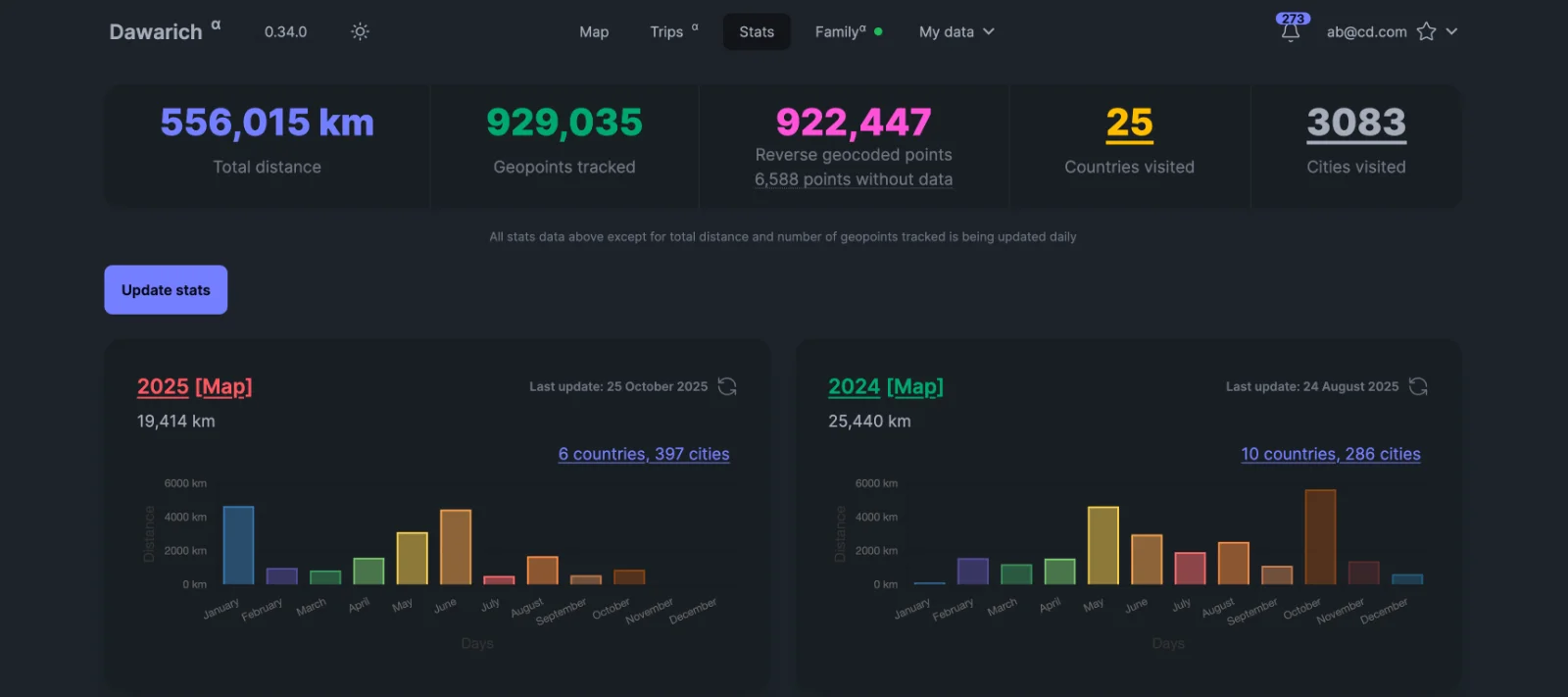
Dawarich is a free, open-source web application that replaces Google Timeline (Google Location History) with something you operate yourself. It is a Ruby on Rails application on PostgreSQL with the PostGIS extension, with Redis for job queues and caching. Points arrive two ways. Phones send them live, through the official Dawarich apps for iOS and Android or through OwnTracks, Overland, GPSLogger or Traccar Client pointed at its API. Older history comes in as files: Google Takeout exports (including the newer on-phone Timeline export), GPX, GeoJSON, KML and KMZ, OwnTracks .rec files and others. From that it draws maps and heatmaps, splits days into tracks and trips, suggests visits, and counts countries, cities and distance.
The project was started by Evgenii Burmakin (Freika on GitHub); its website and the paid, hosted Dawarich Cloud are run by ZeitFlow UG (haftungsbeschränkt) in Berlin. It moves fast. Between 1.14.5 on 13 September 2026 and 1.18.1 on 26 October 2026 it shipped four minor versions, and 1.17.0 alone changed the container layout by folding the background worker into the web container. The README asks you not to update automatically. The security record explains why you should still update deliberately and often: 1.14.5 fixed a registration bypass (GHSA-x483-3xv3-vp52) through which anyone able to reach a self-hosted instance running 1.7.1 to 1.14.4 could create an account, even with sign-ups switched off. When we checked on 4 November 2026, 1.18.1 was the latest release.
Our servers are in Panama City and answer to Panamanian law. A US DMCA notice has no legal effect here, and we act only on valid orders from competent Panamanian authorities.
03/07
Requirements and sizing.
The documented minimum is 2 GB of RAM, one CPU core and 10 GB of disk on AMD64 or ARM64. Since 1.17.0 a default install is three containers: dawarich_app (web server and background jobs in one process), dawarich_db (PostgreSQL 17 with PostGIS 3.5) and dawarich_redis. The project reports roughly 240 MiB for the app container at idle on an instance with 100,000 points, and around 400 MiB under load. The database container is allowed 1 GB of shared memory, and the stock Compose file lets the app use one CPU and up to 4 GB. Only the reverse proxy faces the internet, on ports 80 and 443; the app listens on 3000, and PostgreSQL and Redis stay on Docker's internal network.
Disk grows with the number of points and with STORE_GEODATA, which the Compose file turns on and which keeps the full reverse-geocoding answer alongside each point. As a theoretical example, a phone recording one point every 30 seconds while you move, three hours a day, produces 360 points a day, or about 131,000 a year; a decade of Google history imported at once can run into millions. Transfer is not the constraint. Phone uploads are small JSON requests, and basemap tiles go from the tile server straight to your browser rather than through your VPS.
| Plan | vCPU / RAM / NVMe | Transfer | Price / month | Fit for Dawarich |
|---|---|---|---|---|
| Starter | 2 / 2 GB / 80 GB | 10 TB | $6.99 | At the documented minimum, no headroom for imports. Not recommended. |
| Standard | 4 / 4 GB / 160 GB | 15 TB | $12.99 | One to a handful of users, Takeout imports, an external geocoder. |
| Pro | 6 / 8 GB / 320 GB | 20 TB | $22.99 | A family instance, or Dawarich plus a single-country Photon geocoder. |
| Power | 12 / 16 GB / 640 GB | 40 TB | $42.99 | Dawarich plus a planet-wide Photon index on the same server. |
Reverse geocoding is what pushes you up the table. It is off by default; once enabled, the coordinates of each point go to the provider you configure: the public Photon server run by komoot (held to one request per second), Geoapify, Nominatim, LocationIQ, or chibigeo, a hosted service from the Dawarich team. Dawarich's own documentation warns that you cannot verify what an external geocoder does with what it receives. Running Photon yourself removes that exposure, but the maintainer of the widely used photon-docker image put the planet index at about 200 GB at the start of 2025, growing 10 to 20 GB a year, and its parallel update mode needs twice the space. That does not fit on Standard. A single-country index does, and Power's 640 GB holds the planet with room to update it.
04/07
How to deploy it
with us.
Order Cloud VPS Standard with Debian 13 from the deploy page, add your SSH key, and point a DNS name (below, track.example.com) at the IPv4 address you receive. Install Docker from Docker's own repository, which supports Debian 13, and Caddy from Debian's, as the proxy that terminates TLS:
apt update && apt full-upgrade -y
apt install -y ca-certificates curl ufw caddy
ufw allow 22/tcp && ufw allow 80,443/tcp && ufw enable
install -m 0755 -d /etc/apt/keyrings
curl -fsSL https://download.docker.com/linux/debian/gpg -o /etc/apt/keyrings/docker.asc
echo "deb [arch=$(dpkg --print-architecture) signed-by=/etc/apt/keyrings/docker.asc] https://download.docker.com/linux/debian trixie stable" \
  > /etc/apt/sources.list.d/docker.list
apt update && apt install -y docker-ce docker-ce-cli containerd.io docker-compose-plugin
ufw does not filter ports that Docker publishes, because Docker inserts its own iptables rules, which is why the next step binds the app port to localhost. Take the Compose file from the same tag as the image you intend to run, and pin that tag:
mkdir -p /opt/dawarich && cd /opt/dawarich
curl -fsSLO https://raw.githubusercontent.com/Freika/dawarich/1.18.1/docker/docker-compose.yml
sed -i 's#freikin/dawarich:latest#freikin/dawarich:1.18.1#' docker-compose.yml
DBPASS=$(openssl rand -hex 24)
cat > .env <<EOF
POSTGRES_PASSWORD=$DBPASS
DATABASE_PASSWORD=$DBPASS
SECRET_KEY_BASE=$(openssl rand -hex 64)
APPLICATION_HOSTS=track.example.com,localhost,::1,127.0.0.1
APPLICATION_PROTOCOL=https
TIME_ZONE=America/Panama
DAWARICH_APP_PORT=127.0.0.1:3000
APP_CPU_LIMIT=3
APP_MEMORY_LIMIT=2560M
EOF
chmod 600 .env
The database and the app must share one password, hence the variable. Keep SECRET_KEY_BASE: changing it later signs everyone out and can leave encrypted data unreadable. Leave the localhost entries in APPLICATION_HOSTS, because the container's own health check calls 127.0.0.1 and production mode rejects unlisted hosts. Compose reads .env only to fill placeholders in the Compose file, so a variable the file does not reference never reaches the container. To use two-factor authentication, uncomment the three OTP_ENCRYPTION_* lines in the file and put values from openssl rand -hex 32 in .env. To send email (password resets, invitations), add DOMAIN and the SMTP_* settings under the app's environment:. Outbound port 25 is open on our VPS, though an authenticated relay on 587 will usually deliver better than a fresh IP. The CPU and memory limits are our starting point for a 4 GB machine, chosen to leave PostgreSQL room; they are not a measurement, and TIME_ZONE should be your zone, not the server's.
Replace /etc/caddy/Caddyfile with a site block (Caddy obtains the certificate itself), then start the stack:
track.example.com {
    reverse_proxy 127.0.0.1:3000
}systemctl reload caddy
docker compose config --quiet && docker compose pull && docker compose up -d
docker compose psThe first start runs migrations; wait until all three containers report healthy, and point uptime monitoring at /api/v1/health, since / only redirects to the sign-in page. A fresh instance carries a demo account whose credentials are printed in the Dawarich documentation, so sign in at once and change its email and password; until then, anyone who finds the hostname can log in. Self-hosted sign-ups are off by default, and further users are added under Settings → Users. Your phone app needs the API key from your account settings. OwnTracks in HTTP mode carries that key in the URL, which only matters if you enable Caddy's access log, off by default.
Backups and upgrades belong in the same routine. Before every upgrade, and on a timer otherwise, dump the database and copy it off the server, for instance with restic into an S3-compatible bucket on our object storage:
docker compose exec -T dawarich_db pg_dump -U postgres -Fc dawarich_development \
  > /var/backups/dawarich-$(date +%F).dump
restic -r s3:https://<endpoint>/<bucket> backup /var/backups /var/lib/docker/volumes/dawarich_dawarich_storage
dawarich_development is the Compose default database name even in production mode; leave it unless you rename it everywhere. To upgrade, read the notes for every release between yours and the target, dump, change the tag in docker-compose.yml, then run docker compose pull && docker compose up -d. Some releases carry long data migrations, and 1.17.0 needed the old worker container stopped first. An auto-updater has no way to read release notes, so keep it away from this stack.
05/07
What it costs.
| Item | Per month |
|---|---|
| Cloud VPS Standard (4 vCPU, 4 GB, 160 GB NVMe, 15 TB transfer, 1 Gbps) | $12.99 |
| Daily backups option (+20 %) | $2.60 |
| Object storage, 250 GB bucket for restic | $1.99 |
| Total | $17.58 |
The backup line is 20 % of $12.99, rounded; the total is a sum of catalogue prices. Paid yearly, the VPS alone comes to $116.99 a year. One IPv4 address is included and extra ones are $2 a month. VPS transfer is metered rather than unmetered: Standard includes 15 TB a month, which a personal Dawarich instance is unlikely to approach. The full catalogue is on the pricing page and the Cloud VPS page.
Payment is in crypto only (AVAX, BCH, BNB, BTC, DOGE, ETH, LTC, SOL, TRX, USDC, USDT and XMR), with prices and balances in US dollars. Top-ups run from $25 to $5,000. A $50 top-up earns the 5 % bonus and gives $52.50 of balance, enough for four months of Standard at $51.96, and the unused paid part of a top-up is refundable within 14 days. Ordering requires no identity documents; no-KYC: an email address is enough.
The honest limit of the offer: this is a VPS, not managed Dawarich. Upgrades, database dumps and the occasional test restore are yours to run. Whatever the daily backup option captures, a disk-level copy taken while PostgreSQL is writing does not replace pg_dump, and a backup held by the same provider as the server will not help if you lose access to the account. Keep one copy somewhere else as well.
06/07
Panama, and what it
does not change.
Location history shows home, work, clinics and where you spent the night, so the question of which court can order it handed over is a real one. Our servers sit in PTY1, Panama City, operated by Cyber Host International, S.A. Article 29 of Panama's Constitution allows private communications to be intercepted only on the order of a judicial authority, and private documents to be examined only on the order of a competent authority and for specific purposes. Personal data is governed by Law 81 of 2019, implemented by Executive Decree 285 of 2021. As of 31 October 2026 the US Department of Justice lists CLOUD Act executive agreements only with the United Kingdom and Australia, none with Panama. That is not immunity: a mutual legal assistance treaty in criminal matters has bound Panama and the United States since 6 September 1995, so a US request reaches a Panamanian server through Panamanian authorities and procedure. Law 51 of 2009 obliges telecommunications companies and other networks that sell communication services to keep certain user data for six months; whether it applies to a hosting provider is a question for Panamanian counsel. Our offshore hosting page covers the jurisdiction in more detail.
What Panama protects is the stored history on your server. Everything upstream of it still sees data: the phone's operating system, any cloud sync in your tracking app, the external geocoder if you use one, and the tile server, which learns which areas you browse. A self-hosted Photon and a custom basemap URL close the last two.
07/07
Limits and acceptable
use.
Track yourself and people who have agreed to it. Dawarich's family feature asks members to consent before their earlier history is shared, which is the right model. Using one of our servers to follow a partner, an employee or anyone else without their knowledge is something we would treat as manifestly unlawful, and we act in that case, as we do on a decision of a competent Panamanian authority (our acceptable use policy). If other people's data sits on your instance, you are responsible for it: their consent and rights under Law 81, and the GDPR for anyone in the EU. Panama has no EU adequacy decision, so transferring EU personal data to a server here needs appropriate safeguards such as the 2021 standard contractual clauses.
Catalogue·Options
Every configuration, every option, every price.
Six cloud VPS plans on AMD EPYC with local NVMe. Transfer is included on every plan, from 10 TB to 100 TB a month.
| Plan | vCPU | Memory | NVMe | Transfer | Port | Price | Deploy |
|---|---|---|---|---|---|---|---|
| StarterStaging, dev | 2 | 2 GB | 80 GB | 10 TB / month | 1 Gbps | $6.99/mo | Deploy Starter |
| StandardRecommendedSmall apps | 4 | 4 GB | 160 GB | 15 TB / month | 1 Gbps | $12.99/mo | Deploy Standard |
| ProProduction | 6 | 8 GB | 320 GB | 20 TB / month | 1 Gbps | $22.99/mo | Deploy Pro |
| PowerHeavy workloads | 12 | 16 GB | 640 GB | 40 TB / month | 2 Gbps | $42.99/mo | Deploy Power |
| UltraDatabases | 16 | 32 GB | 1000 GB | 60 TB / month | 2 Gbps | $65.99/mo | Deploy Ultra |
| TitanDense hosts | 32 | 64 GB | 2000 GB | 100 TB / month | 5 Gbps | $119.99/mo | Deploy Titan |
Every plan runs on AMD EPYC with local NVMe. Yearly billing costs about 25% less.
Every plan
- AMD EPYCon every host
- Local NVMenot network storage
- DDoS protectionalways on
- 1 IPv4 addressmore at $2 each
- VNC consoleand full root access
FAQ
Questions
people ask first.
Short answers about running this in PTY1. If yours is not here, open a ticket from your panel.
Can I run Dawarich on the $6.99 Starter plan?
It will start, since Starter matches the documented 2 GB minimum. Since 1.17.0, though, imports run in the same container as the web server, and on 2 GB a large import competes with PostgreSQL and Redis for every megabyte. For one person recording live with no backlog it can work; for anything else, take Standard.
Does Dawarich send my coordinates anywhere?
Reverse geocoding is off by default; switch it on and each point goes to the geocoder you chose. Basemap tiles come from a tile server, which sees the areas you view but not your track, and version checks run against GitHub in the background. Telemetry has been off by default since 0.19.6, in December 2024. Self-host Photon and set a custom basemap URL if you want none of this leaving the server.
Can I import my whole Google Timeline?
Yes, from Google Takeout files, including the export made on the phone. Since 1.17.0, large JSON imports no longer need memory in proportion to the file size, which was what used to bring small servers down. Keep the original files after importing, as the project advises.
Can I keep the database on object storage?
No. Our object storage is S3-compatible buckets reached through an API, not a disk you can format or put PostgreSQL on. Use it for pg_dump files and restic snapshots, as shown above.
What happens if a foreign authority asks for my data?
A request from abroad has to go through Panamanian authorities; from the United States, that usually means the 1995 mutual legal assistance treaty. We act on a decision of a competent Panamanian authority. Questions about a specific request go through a support ticket from the client panel, which is also how to reach us about anything on this page.
Sources
Every fact on this page, with its source
Checked 4 Nov 2026 unless noted.
Panamanian law and authorities
- Law 81 of 2019 and Executive Decree 285 of 2021Gaceta Oficial 28743-A
- Law 51 of 2009, art. 6, six-month retentionGaceta Oficial 26374
- Constitution of Panama, art. 29G.O. 25176 (Legispan)
EU and other countries
Industry, providers and software
- Default Compose file (PostgreSQL 17 / PostGIS 3.5, shm_size, port and resource variables, STORE_GEODATA)GitHub, docker/docker-compose.yml
- Release 1.18.1, latest at time of checkingGitHub
- Release 1.17.0, background jobs moved into the app containerGitHub
- Release 1.16.0, / redirects to sign-in, health checks on /api/v1/healthGitHub
- Release 1.14.5 and advisory GHSA-x483-3xv3-vp52; releases 1.13.1 and 1.14.3 on geocoding, tile server and background version checksGitHub releases
- README (do not update automatically, keep original data)GitHub
- Docker Engine support for Debian 13Docker docs
Other references
- Dawarich hardware requirements (2 GB RAM, 1 core, 10 GB; single-container memory figures since 1.17.0)dawarich.app
- Self-hosting introduction (three containers, default demo account, Compose file location)dawarich.app
- Environment variables (SECRET_KEY_BASE, APPLICATION_HOSTS, DOMAIN, OTP keys, production host checks)dawarich.app
- Reverse geocoding providers and the warning about external servicesdawarich.app
- Telemetry off by default since 0.19.6 (2024-12-11)Dawarich changelog
- Author and open-source statusDawarich blog, January 2025 update
- Photon planet index size and parallel updatesrtuszik/photon-docker on Docker Hub
- Panama–US mutual legal assistance treaty, in force 6 September 1995US Department of State
Your server in Panama,
ready when you are.
Cloud VPS start at $6.99 a month and are ready 60 to 120 seconds after you order.