Self-hosted app·Personal data, cameras and smart home
AdventureLog hosting
in Panama City.
AdventureLog hosting on a Cloud VPS in Panama City: Docker Compose setup for v0.13.1, sizing, backups and costs. 4 vCPU, 4 GB RAM from $12.99/mo.
- Django
- PostgreSQL
- Caddy
- Docker
PTY1·Panama City
In stockRecommended for this use case
- 1 Gbps port15 TB of transfer a monthIncluded
- Debian 13preinstalled with the orderIncluded
- DDoS protection, 1 IPv4VNC console and full rootIncluded
Optional: daily backups +20% · extra IPv4 $2 · priority support $10
Pay yearly: $116.99 a year, about 25% less
- No KYC
- Crypto only
- Panama jurisdiction
- 4 vCPU, 4 GB RAM
- 160 GB NVMe local storage
- 15 TB transfer on a 1 Gbps port
- DDoS protection included
- Panamanian law
01/07
Short answer.
Yes. AdventureLog runs on our Cloud VPS Standard plan (4 vCPU, 4 GB RAM, 160 GB NVMe, 15 TB of monthly transfer) for $12.99 a month, deployed with Docker Compose on Debian 13 in PTY1, our Panama City facility. The number that decides the plan is memory on first boot: upstream asks for at least 2 GB while the application imports its world geography dataset, and about 1 GB afterwards. Our Starter plan has exactly 2 GB, which leaves nothing for Debian and PostgreSQL during that import, so Standard is the plan we recommend. Before the instance faces the internet, change two defaults that ship with it: the published port listens on every interface, and the first-boot superuser is admin with the password admin.
02/07
What AdventureLog
is and who runs it.
AdventureLog is an open-source travel tracker and trip planner that you host yourself. It is licensed under GPL-3.0 and developed on GitHub by Sean Morley together with a sizeable group of community contributors; the repository had roughly 3,500 stars when we looked in November 2026. The current release, v0.13.1, came out on 27 October 2026, and its notes call the upgrade strongly recommended because a dependency refresh resolved around 150 published security advisories across the backend, the frontend and the container images.
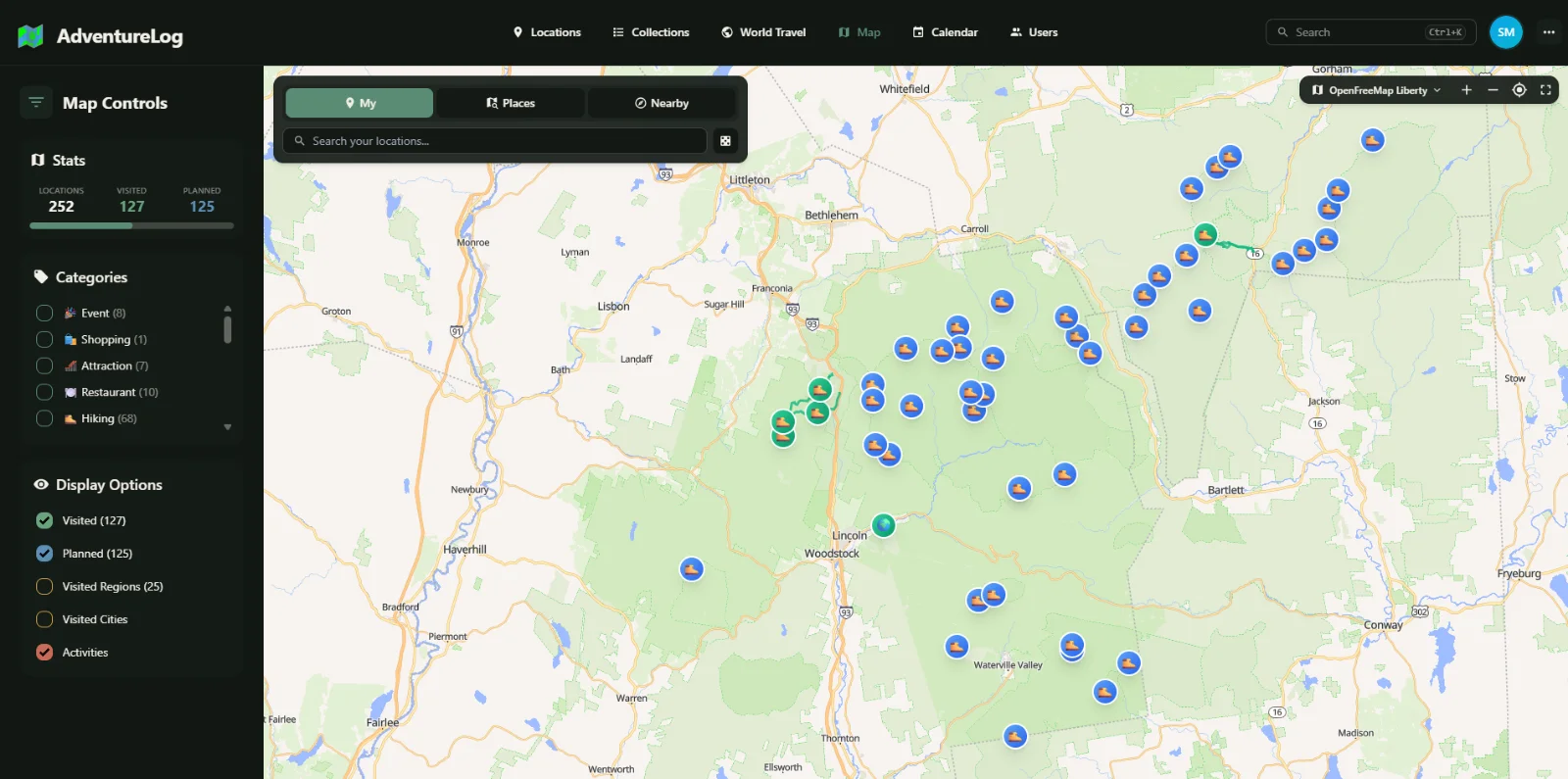
The stack is a SvelteKit frontend, a Django backend and a PostGIS database. You record places as locations with dated visits and group them into collections, which carry an itinerary, lodging, transport legs, notes, checklists and a budget. The app keeps track of the countries, regions and cities you have visited and draws them on a map. A collection for a week between Boquete and Bocas del Toro, for example, holds the hotel bookings and the bus and water-taxi legs with their prices, and it exports as a printable day-by-day PDF or as an ICS file for your calendar. Optional integrations import photos from Immich, activities from Strava or Endurain, and trails from Wanderer; sign-in supports OIDC providers and multi-factor authentication.
Most instances belong to an individual or a family keeping their own travel history, to a small group sharing collections for a joint trip, or to someone who already runs Immich and wants those photos pinned to a map. Every one of them ends up with the same kind of data on disk: a dated record of where people were, frequently with GPS coordinates read from photo EXIF. That data is the reason the location of the server is worth thinking about.
Our servers are in Panama City and answer to Panamanian law. A US DMCA notice has no legal effect here, and we act only on valid orders from competent Panamanian authorities.
03/07
Requirements and sizing.
Since v0.13.0 the default "Standard Deployment" runs two containers. One image, ghcr.io/seanmorley15/adventurelog, bundles the frontend and the backend behind a single port; the other is postgis/postgis:16-3.5. The older three-container "Advanced Deployment" is still documented for people who want the frontend and backend split, for instance behind an existing Traefik. Neither layout needs a GPU or anything unusual from the kernel, and once a reverse proxy sits in front, only ports 80 and 443 face the public.
| Resource | Upstream guidance | Cloud VPS Standard |
|---|---|---|
| CPU | No stated minimum; Gunicorn runs 2 workers by default | 4 vCPU |
| RAM | At least 2 GB on first boot, about 1 GB in steady state | 4 GB |
| Disk | Application image about 1 GB, plus database and media | 160 GB NVMe |
| Network | One HTTP port (8015 by default) behind a TLS proxy | 1 Gbps, 15 TB transfer per month |
Disk is where a travel log grows, and the growth is photos. As a theoretical calculation, at an assumed 4 MB per phone photo, 120 GB reserved for media holds about 30,000 images. Halve that if you keep the upstream backup script's output on the same disk, because every backup folder contains a full archive of the media volume. If your library is larger than that, or you want copies off the machine, put media in a bucket on our object storage from the first day instead of buying a bigger VPS for disk alone. Transfer is not a practical limit for a personal instance, though it is a limit: VPS traffic is not unmetered, and Standard includes 15 TB a month.
04/07
How to deploy it
with us.
- 01
1. Order the server and point a hostname at it
Order through the Standard deploy link, which preselects Debian 13. Create an A record for the hostname you will use (
travel.example.combelow) pointing to the server's IPv4 address. Do this early, because Caddy needs the record to resolve before it can obtain a certificate in step 5. - 02
2. Install Docker, git and Caddy
Install Docker Engine from Docker's own apt repository, following the Debian instructions on docs.docker.com; Debian 13 "trixie" is a supported release. Remove Debian's
docker.iopackage first if the image happens to carry it. Then:sudo apt install docker-ce docker-ce-cli containerd.io docker-buildx-plugin docker-compose-plugin git caddy - 03
3. Fetch the release and configure it before first boot
Clone the release tag rather than downloading the compose file alone. The tag gives you the upstream backup, restore and validation scripts as well.
sudo git clone --depth 1 --branch v0.13.1 https://github.com/seanmorley15/AdventureLog.git /opt/adventurelog
cd /opt/adventurelog
sudo cp .env.example .env
The superuser is created from
.envon the first start, so set it now rather than changingadmin/adminafterwards. Edit.env:POSTGRES_PASSWORD=<output of: openssl rand -hex 24> SITE_URL=https://travel.example.com HOST_PORT=8015 DJANGO_ADMIN_USERNAME=<anything but admin> DJANGO_ADMIN_PASSWORD=<long random string> DJANGO_ADMIN_EMAIL=you@example.com DISABLE_REGISTRATION=True ENABLE_RATE_LIMITS=True AUTH_PASSWORD_VALIDATORS_ENABLED=True ACCOUNT_PASSWORD_MIN_LENGTH=12The Django secret key, the CSRF origins and the internal URLs are derived from
SITE_URLat startup, and since v0.13.1 the container refuses to start ifSITE_URLdoes not begin withhttp://orhttps://. - 04
4. Bind the port to loopback and start the stack
The upstream compose file publishes port 8015 on all interfaces. Docker's documentation is explicit that published container ports bypass ufw and firewalld rules, so a host firewall will not save you here. Rebind the port to loopback, validate the environment, and start:
sudo sed -i 's/"${HOST_PORT:-8015}:80"/"127.0.0.1:${HOST_PORT:-8015}:80"/' docker-compose.yml
sudo bash scripts/validate-env.sh .env
sudo docker compose --env-file .env up -d --wait
sudo docker compose --env-file .env logs -f app
The first start imports countries, regions and cities, which is the memory peak discussed above. Follow the logs until the import finishes and the health check passes.
- 05
5. Put Caddy in front for TLS
Replace the contents of
/etc/caddy/Caddyfilewith:travel.example.com { reverse_proxy 127.0.0.1:8015 }Run
sudo systemctl reload caddy. Caddy fetches a Let's Encrypt certificate on its own as long as ports 80 and 443 are reachable. Sign in with the account you set in.envand turn on multi-factor authentication under Settings → Security. - 06
6. Backups, offsite copies and updates
scripts/backup.shwrites a timestamped folder underbackups/containing your.env, a PostgreSQL dump (database.sql) and an archive of the media volume (media.tar.gz). A backup on the same disk protects you from a bad upgrade and from nothing else, so copy it to an S3 bucket with restic or rclone and prune the local folders. A daily job such as/etc/cron.daily/adventurelog-backup:#!/bin/sh # /root/.restic-env exports RESTIC_REPOSITORY, RESTIC_PASSWORD, AWS_ACCESS_KEY_ID and AWS_SECRET_ACCESS_KEY set -e cd /opt/adventurelog bash scripts/backup.sh . /root/.restic-env restic backup backups/ find backups/ -mindepth 1 -maxdepth 1 -mtime +7 -exec rm -rf {} +RESTIC_REPOSITORYtakes the forms3:https://<endpoint shown in your client panel>/<bucket>/adventurelog. Make the script executable withchmod +x.If you would rather keep photos off the VPS disk altogether, set
MEDIA_STORAGE=s3with theAWS_*variables from.env.example(endpoint, bucket, access keys,AWS_S3_ADDRESSING_STYLE=path) before the first start. Upstream describes moving an existing instance from local media to S3 as complex and error-prone, and recommends deciding at install time. Our buckets are reached through the S3 API, as AdventureLog's own storage backend expects; they are not a disk to format or mount, and nothing involving PostGIS should ever sit on anrclone mount.For updates, read the release notes, then run
sudo bash scripts/deploy.sh --backup, which validates the environment, takes a backup, pulls the images and waits for the health check. The compose file follows the:latesttag, so any pull is an upgrade to whatever was last published. If you want upgrades on your own schedule, replace:latestwith the release tag listed on the project's GHCR package page, and re-apply the loopback edit from step 4 whenever you replace the compose file.
05/07
Cost.
| Item | Per month |
|---|---|
| Cloud VPS Standard: 4 vCPU, 4 GB RAM, 160 GB NVMe, 15 TB transfer, 1 Gbps | $12.99 |
| Daily VPS backups (+20 % of the plan) | $2.60 * |
| Object storage bucket, 250 GB, for offsite backups or media | $1.99 |
| Standard plus a 250 GB bucket | $14.98 * |
| Standard billed yearly (about −25 %) | $116.99 a year, ≈ $9.75 a month * |
Starred figures are our arithmetic on catalogue prices, so theoretical: 12.99 × 0.20, 12.99 + 1.99 and 116.99 ÷ 12. The full price list is on /pricing/.
The plan includes full root access, the Debian 13 image and the monthly transfer shown. Outbound port 25 is open on every VPS, which matters if you want AdventureLog to send invitations and password resets through your own mail server; most people will relay through a mail provider on port 587 instead and avoid managing IP reputation. Options are an extra IPv4 address at $2 a month and priority support at $10 a month. What the price does not include is anyone running AdventureLog for you: we operate the virtual machine, and the application, its updates and its backups are yours.
Payment is in cryptocurrency only: AVAX, BCH, BNB, BTC, DOGE, ETH, LTC, SOL, TRX, USDC, USDT or XMR, with prices and balances kept in US dollars. Top-ups run from $25 to $5,000 and carry a bonus of 5 % from $50, 10 % from $100, 15 % from $250 and 20 % from $500. As a theoretical example, a $100 top-up becomes a $110 balance, enough for about eight and a half months of Standard. The unused paid part of a top-up is refundable within 14 days.
06/07
What hosting in Panama changes,
and what it does not.
Your instance runs in PTY1, Panama City, on infrastructure operated by Cyber Host International, S.A., Addison House Plaza, 1st floor, Panama City, under Panamanian law. Article 29 of the Constitution allows private communications to be intercepted or recorded only on the order of a judicial authority, and private documents to be examined only on the order of a competent authority and for specific purposes. Personal data is governed by Law 81 of 2019, implemented by Executive Decree 285 of 2021. As of 31 October 2026, the US Department of Justice lists CLOUD Act executive agreements only with the United Kingdom and Australia, none with Panama. A US authority that wants data from a server here would normally go through the mutual legal assistance treaty in force between the two countries since 6 September 1995, which runs through Panamanian authorities. That is a procedure with Panamanian safeguards, not immunity, and we describe it as such on our offshore hosting page. One open question belongs in the same paragraph: Law 51 of 2009 requires telecommunications companies and other networks that provide communication services to keep certain user data for six months, and whether it applies to a hosting provider is a matter for Panamanian counsel.
If your instance holds data about EU residents, remember that Panama has no EU adequacy decision; the transfer needs appropriate safeguards such as the 2021 standard contractual clauses.
The larger limit is technical. Jurisdiction covers data at rest on the server; it has no say over requests your instance sends elsewhere. Depending on configuration, AdventureLog sends geocoding and place searches to Google Maps or OpenStreetMap, description lookups to Wikipedia, and calls external services for recommendations and sunrise and sunset times, while each visitor's browser loads map tiles from OpenFreeMap or, with a key, from CARTO. Each of those providers sees roughly which places you are looking at. If keeping that to a minimum is the reason you self-host, leave GOOGLE_MAPS_API_KEY and PUBLIC_CARTO_BASEMAP_API_KEY unset, leave the Strava integration unconfigured, and accept that OpenStreetMap-backed lookups still leave the machine.
07/07
Limits and acceptable
use.
You operate the AdventureLog instance; we provide the server underneath it. That makes patching your job, and v0.13.1 is a good illustration of why it should not wait. Keep registration closed unless you intend to run a service for other people. Once you open it, you are holding other people's location history and photos, with the obligations that Law 81 and, for EU residents, the GDPR attach to that.
Using AdventureLog to record or publish another person's whereabouts without their consent is not allowed on our network, and neither is sharing collections that contain unlawful material. A DMCA notice has no legal effect on servers in Panama. We forward copyright complaints to the customer and act on a decision of a competent Panamanian authority, or where the content is manifestly unlawful. The full rules are in our acceptable use policy. Questions about any of this go through a support ticket opened from the client panel.
Catalogue·Options
Every configuration, every option, every price.
Six cloud VPS plans on AMD EPYC with local NVMe. Transfer is included on every plan, from 10 TB to 100 TB a month.
| Plan | vCPU | Memory | NVMe | Transfer | Port | Price | Deploy |
|---|---|---|---|---|---|---|---|
| StarterStaging, dev | 2 | 2 GB | 80 GB | 10 TB / month | 1 Gbps | $6.99/mo | Deploy Starter |
| StandardRecommendedSmall apps | 4 | 4 GB | 160 GB | 15 TB / month | 1 Gbps | $12.99/mo | Deploy Standard |
| ProProduction | 6 | 8 GB | 320 GB | 20 TB / month | 1 Gbps | $22.99/mo | Deploy Pro |
| PowerHeavy workloads | 12 | 16 GB | 640 GB | 40 TB / month | 2 Gbps | $42.99/mo | Deploy Power |
| UltraDatabases | 16 | 32 GB | 1000 GB | 60 TB / month | 2 Gbps | $65.99/mo | Deploy Ultra |
| TitanDense hosts | 32 | 64 GB | 2000 GB | 100 TB / month | 5 Gbps | $119.99/mo | Deploy Titan |
Every plan runs on AMD EPYC with local NVMe. Yearly billing costs about 25% less.
Every plan
- AMD EPYCon every host
- Local NVMenot network storage
- DDoS protectionalways on
- 1 IPv4 addressmore at $2 each
- VNC consoleand full root access
FAQ
Questions
people ask first.
Short answers about running this in PTY1. If yours is not here, open a ticket from your panel.
Can AdventureLog run on the $6.99 Starter VPS?
It can start, but we would not run it there. Starter's 2 GB of RAM equals the documented first-boot minimum with nothing left for Debian, PostgreSQL and Docker. You can lower the load with GUNICORN_WORKERS=1 and with SKIP_WORLD_DATA=1, which postpones the geography import, yet you are then tuning around a shortage on day one. Standard at $12.99 gives the stack headroom.
Should I use the Standard or the Advanced deployment?
Standard, unless you have a concrete reason. One container, one loopback port and a Caddy block in front is the simplest arrangement to secure and to update. Advanced makes sense when you need the frontend and backend on separate URLs or already route everything through Traefik.
Can my photos live in your object storage instead of on the VPS disk?
Yes, through AdventureLog's native S3 backend with MEDIA_STORAGE=s3, the bucket's endpoint and access keys, and path-style addressing. Configure it before the first start, because upstream advises against migrating an instance with existing local media. The bucket is billed by size only, with no request fees, and it is not a block device.
Which ports need to be open?
Inbound, 22 for SSH and 80 and 443 for Caddy. Port 8015 stays bound to 127.0.0.1. Outbound, the server needs to reach the container registries for updates, the external services listed above, and your mail relay if you configure email.
Do I need ID or a bank card to order?
No. Ordering is no-KYC: an email address is enough, and payment is in cryptocurrency. Our no-KYC hosting page sets out what we ask for and what we do not.
Does a US subpoena or a DMCA notice reach my instance directly?
Neither has direct effect on a server in Panama. A DMCA notice is forwarded to you as a copyright complaint. A US request for data would go through the mutual legal assistance treaty and Panamanian authorities, and Article 29 of the Constitution requires a judicial order to intercept communications. None of that shields content that is unlawful under Panamanian law.
Sources
Every fact on this page, with its source
Accessed 4 Nov 2026 unless noted.
Panamanian law and authorities
- Law 81 of 26 March 2019 on personal data protection, Gaceta Oficial 28743-A; implemented by Executive Decree 285 of 28 May 2021gacetaoficial.gob.pa
- Law 51 of 2009, art. 6 (six-month retention by telecommunications providers), Gaceta Oficial 26374gacetaoficial.gob.pa
- Constitution of Panama, art. 29, G.O. 25176 (Legispan)s3-legispan.asamblea.gob.pa
EU and other countries
- CLOUD Act executive agreements, US Department of Justice (verified 31 October 2026)justice.gov · verified 31 Oct 2026
- GDPR article 46 (appropriate safeguards)eur-lex.europa.eu
- Commission Implementing Decision (EU) 2021/914 (standard contractual clauses)eur-lex.europa.eu
Industry, providers and software
- AdventureLog v0.13.1 "Cadillac" release notes, GitHub, published 27 October 2026 (accessed 4 November 2026)github.com
- AdventureLog v0.13.0 "Acadia" release notes, GitHub, published 12 August 2026 (accessed 4 November 2026)github.com
- AdventureLog repository and licence, GitHub (accessed 4 November 2026)github.com
- Standard Deployment documentation: single container, 2 GB first boot and about 1 GB steady state, image size, default admin login (accessed 4 November 2026)github.com
- Advanced Deployment documentation: three-container layout and memory guidance (accessed 4 November 2026)github.com
- docker-compose.yml at tag v0.13.1: images, port mapping, volumes, health checks (accessed 4 November 2026)github.com
- .env.example at tag v0.13.1 (accessed 4 November 2026)github.com
- Environment variables reference at v0.13.1: GUNICORN_WORKERS, SKIP_WORLD_DATA, registration, rate limits, media storage, integrations (accessed 4 November 2026)github.com
- Operations and maintenance at v0.13.1: backup.sh, restore.sh, deploy.sh (accessed 4 November 2026)github.com
- S3 media storage at v0.13.1, including the advice to choose storage at install time (accessed 4 November 2026)github.com
- Docker Engine on Debian: Debian 13 support and published ports bypassing ufw and firewalld (accessed 4 November 2026)docs.docker.com
Your server in Panama,
ready when you are.
Cloud VPS start at $6.99 a month and are ready 60 to 120 seconds after you order.